For decades, one system has quietly powered nearly every connection on the internet: Internet Protocol version 4, or IPv4. You can think of it as the internet's own postal service, giving a unique address to every computer, phone, and server so that data—from a simple email to a critical file transfer—finds its way to the right place.
What Is IP Version 4
Let's imagine your business network is a massive office building. For a package to get from your desk on the 10th floor to a client's office across town, it needs a specific street address. IPv4 works the same way for data, assigning a unique numerical label to every device so that information gets delivered accurately. For example, when you type www.google.com into your browser, your computer sends a request to Google's server at an IPv4 address like 142.250.203.110.
This simple concept is the bedrock of your day-to-day operations. It’s what allows your team to access company resources from home, share files instantly, and connect with customers online. For any business that relies on the internet (which is pretty much every business these days), getting to grips with IPv4 is the first step toward building a reliable and secure network.
Before we dive deep, here’s a quick overview of the core concepts we’ll be covering.
IPv4 at a Glance Key Concepts
| Concept | Simple Analogy | Business Relevance |
|---|---|---|
| Address Structure | A street address (e.g., House Number, Street, City, Postcode). | Determines how many devices you can have on your network. |
| Subnetting | Dividing a large city into smaller neighbourhoods. | Improves network performance and security by organising traffic. |
| Public vs. Private IP | A public mailbox vs. an internal office mail cubby. | Manages how your internal devices connect to the global internet. |
| NAT | A receptionist directing all incoming calls to the right person. | Allows multiple internal devices to share a single public IP address. |
| IPv4 Header | The "To" and "From" addresses written on an envelope. | Contains routing information to guide data packets to their destination. |
This table is just a starting point. Now, let's explore what makes this system tick.
The Foundation of Internet Communication
When IPv4 was formally rolled out in the early 1980s, it offered a pool of about 4.3 billion unique addresses. Back then, that number felt practically infinite. Nobody could have predicted the explosion of internet-connected devices we see today.
This massive growth has put a huge strain on the limited supply of IPv4 addresses. Here in the Philippines, where internet penetration hit roughly 89 percent by early 2024, the crunch is real. This scarcity makes smart management of your company's IP addresses more important than ever. You can read more about national efforts to boost IPv6 adoption on mb.com.ph.
For a business like REDCHIP IT SOLUTIONS, which handles networks with thousands of devices, knowing the limits of IPv4 isn't just academic—it's a core part of strategic planning.
An IPv4 address is more than just a string of numbers; it's the unique identifier that allows your devices to communicate globally. Without it, your network would be isolated and unable to connect to the outside world.
From the computer on your desk to the servers in your data centre, every single device needs one of these addresses to get online. That makes IPv4 a non-negotiable part of your IT infrastructure, one that directly impacts how your business operates and grows.
How IPv4 Addresses and Subnets Organise Your Network
At first glance, an IPv4 address like 192.168.1.10 might look like a random jumble of numbers. But it’s actually structured with a very clear purpose, a bit like a phone number. Think of one part as the 'area code' for your entire network, and the other part as the specific 'local number' for a single device within that network.
This two-part structure is the secret to how data packets find their way home. The first section, the network portion, acts like a digital post code, guiding data to the right general area—your office network, for example. Once it arrives, the second section, the host portion, pinpoints the exact device the data is meant for, whether it’s your laptop, a server, or a printer.
This simple but brilliant division is the bedrock of how IPv4 keeps internet traffic orderly. Without it, data packets would be like letters addressed to a city with no street names or house numbers—completely lost.
Dividing Your Network with Subnetting
Now, let's get practical. Imagine your business has different departments—Finance, Sales, and Operations. You definitely don’t want sensitive financial data floating around on the same network segment as the sales team’s public demos. This is where a clever technique called subnetting comes into the picture.
Subnetting lets you carve up your main business network into smaller, more secure, and more efficient segments called subnets. It's like putting up digital walls between your departments. This not only enhances security but also significantly improves your network's performance by keeping traffic contained where it belongs, which helps reduce overall congestion. For instance, a large video file being shared within the sales department won't slow down the finance team's access to their accounting software.
The tool that makes this all possible is the subnet mask, which looks something like 255.255.255.0. It works hand-in-hand with the IPv4 address to tell every device which part of the address is the network's 'area code' and which part is the device's unique 'local number'.
The diagram below shows where IPv4 fits within the broader communication stack, acting as the fundamental layer that connects devices across networks and the internet.
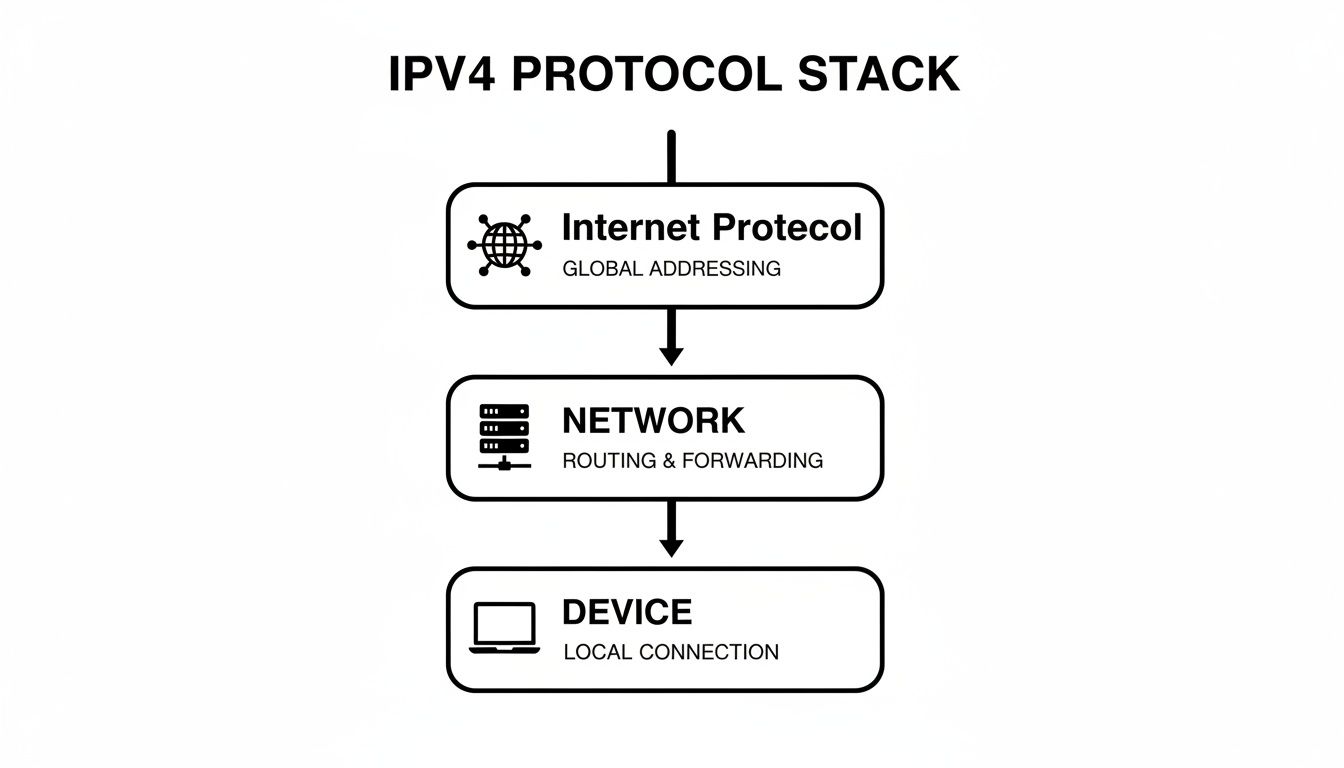
As you can see, the Internet Protocol is the foundation that enables everything else, from local network chats to global web browsing.
Practical Examples of Subnetting in Action
Subnetting isn't just theory; it’s a powerful tool with real-world benefits for your business's security and day-to-day operations. By creating separate subnets, you build a much more organised and resilient network.
Here are a few ways businesses use it every day:
- Guest Wi-Fi: You can set up a completely separate subnet just for visitors. This gives them the internet access they need without ever letting them near your internal company servers, printers, or employee computers. For example, guests might connect to a network named "CafeGuest" on subnet
192.168.2.0/24, while your staff uses "CompanyPrivate" on192.168.1.0/24. - Point-of-Sale (POS) Systems: For any retail or hospitality business, putting all your payment terminals on their own dedicated subnet is a must. It isolates that critical transaction data, adding a vital layer of security. This means if the guest Wi-Fi is compromised, attackers can't see the POS terminals.
- Voice over IP (VoIP) Phones: VoIP systems need a stable, high-quality connection to work well. Placing them on their own subnet allows you to prioritise their traffic, ensuring your calls are always crystal-clear and don’t get interrupted by someone downloading a large file.
Subnetting essentially transforms a single, potentially chaotic network into multiple, well-organised zones. This segmentation is a cornerstone of modern network security, as it helps prevent a breach in one area from spreading across your entire company.
Of course, setting up a network is one thing, but keeping it running smoothly is another. Knowing how to approach troubleshooting IP configuration failures is crucial for preventing costly downtime, and having a properly segmented network often makes finding and fixing problems much easier.
Understanding Public vs Private IPv4 Addresses
Think about your business's phone system for a moment. You have a main public number that customers call, and then you have a set of internal extensions for your team. IPv4 addresses work in a very similar way, falling into two main categories: public and private.
A public IPv4 address is like your company's main phone number listed in the directory. It's a globally unique address assigned to your network by your Internet Service Provider (ISP), and it’s the face your network shows to the rest of the world. A practical example is 203.0.113.42, which could be the address for your company's main web server.
In contrast, private IPv4 addresses are the internal extensions. These are the addresses used by the devices inside your local network—your computers, printers, and internal servers—to talk to each other. You'll often see them starting with common patterns like 192.168.1.101 or 10.0.0.52, and they are completely invisible to the outside internet.

This distinction isn't just a technical detail; it's a fundamental part of network security and efficiency. By keeping all your internal devices on a private network, you inherently shield them from direct, unsolicited contact from the public internet.
The Digital Receptionist: Network Address Translation
So if all your office devices have private, "unlisted" addresses, how do they actually get online? This is handled by a clever bit of networking magic called Network Address Translation (NAT).
Think of NAT as your company’s digital receptionist, sitting at the front desk of your network (which is usually your router).
When a computer inside your office wants to visit a website, its request doesn't go straight to the internet. Instead, it goes to the router. The router takes the request, swaps out the computer’s private IP address for the company's single public IP address, and sends it on its way.
When the website responds, it sends the data back to your public address. The router then checks its log, sees which internal device originally sent the request, and forwards the response to the correct computer using its private address. To the user, the whole process is completely seamless.
For small and medium businesses, NAT is indispensable. It allows dozens, or even hundreds, of internal devices to share a single public IPv4 address, which significantly reduces costs and simplifies network management.
This clever system delivers two massive advantages for any business:
- Cost-Efficiency: Instead of needing to lease a unique, and often costly, public IP address for every single device, your entire office can share just one.
- Enhanced Security: NAT acts as a natural firewall. By hiding your internal network's structure, it makes it incredibly difficult for outsiders to directly target and attack individual devices within your organisation.
How Your Data Travels Using the IPv4 Header
When you hit 'send' on an email, that message doesn't just fly across the internet as a single, complete file. It gets broken down into tiny digital pieces called packets. Each of these packets is then given a virtual shipping label, which we call an IPv4 header. This header is a compact set of instructions that tells the network exactly how to handle the packet, ensuring it gets to the right place and doesn't get lost along the way.
Think of it like sending a multi-volume encyclopedia through the post. You wouldn't send it in one giant, unwieldy box. Instead, you'd pack each book into its own parcel and stick a detailed address label on it. That label is the IPv4 header, and without it, your data would be floating aimlessly in the digital wilderness.
This entire process is happening constantly, behind the scenes, every time your business sends or receives information. It's the fundamental mechanism that allows data to navigate the massively complex web of the internet.
Key Information on the Shipping Label
The IPv4 header itself is packed with technical details, but for practical purposes, you only need to focus on a few key fields that do most of the heavy lifting. Understanding these will give you a solid grasp of how data actually moves.
Here are the most important parts:
- Source IP Address: This is essentially the 'return address' on the parcel. It’s the public IPv4 address of the computer or network that sent the data packet in the first place. For example,
203.0.113.5. - Destination IP Address: This is the 'ship to' address. It gives routers the exact location where the packet needs to go, whether that's a web server on another continent or a client's laptop just down the road. For example,
198.51.100.12. - Time to Live (TTL): This is a clever little failsafe. Think of it as a 'destroy by' date for your packet. The TTL is a number (e.g., 64) that goes down by one every time the packet passes through a router. If it ever reaches zero, the packet is automatically discarded. This prevents lost packets from bouncing around the internet forever, caught in an endless loop.
The real genius of the IPv4 header is that it makes every data packet a self-sufficient traveller. Each one has all the information it needs to find its own way, which is a big part of what has made IPv4 so incredibly reliable for decades.
A Packet's Journey Across the Internet
Let’s walk through a real-world example. Say an employee at your office needs to upload a large report to a cloud server. That report is instantly broken into hundreds or thousands of packets. Each packet gets an IPv4 header slapped on it, listing your office's public IP as the source and the cloud server's IP as the destination.
These packets first go to your office router. The router glances at the destination address on each header and forwards them on to your Internet Service Provider. From there, the packets begin hopping between a series of routers across the internet. At each hop, a router reads the header and makes a split-second decision on the best path forward. This continues until they all arrive at the destination server, where they’re reassembled back into the original report.
Of course, IP works hand-in-hand with other protocols. Once the data arrives at the correct computer, it needs to know which application to go to. You can learn more about how a TCP/IP port helps direct traffic to the right software on the other end.
The Limits of IPv4 and the Future with IPv6
For a long time, IPv4 was the bedrock of the internet. It gave every connected device its own unique address, and it worked beautifully. But it had a fundamental flaw: a limited supply. The system was designed with a cap of roughly 4.3 billion addresses. Back in the 1980s, that number seemed almost infinite.
Fast-forward to today, and that "infinite" pool has completely run dry. The explosion of internet users, smartphones, servers, and all sorts of smart gadgets has used up every last available new IPv4 address. Imagine a city that has given out every possible phone number—that's where we are now. This problem, known as IPv4 exhaustion, is a major headache for businesses that need to grow, add more devices, or open new branches.
When you can't get new public IP addresses easily, your ability to scale comes to a screeching halt. This scarcity forces everyone to be much smarter about managing the addresses they already have.
Introducing IPv6: The Next Generation Solution
Engineers saw this problem coming from a mile away and developed a successor: Internet Protocol version 6 (IPv6). To put the difference in perspective, if IPv4 was a city with a limited block of phone numbers, IPv6 is a system so enormous it could assign a unique address to every grain of sand on the planet and still have trillions left over.
This practically bottomless supply of addresses is the headline feature of IPv6. It completely solves the exhaustion problem, clearing the way for the internet to keep growing for generations to come.
The move from IPv4 to IPv6 isn't just a simple tech update. It's a critical evolution that paves the way for future innovation. For any business, getting on board with IPv6 is about future-proofing your network so you aren't held back by yesterday's limitations.
If you want to get into the nuts and bolts of the new protocol, our guide explains in detail what Internet Protocol version 6 is and why it's becoming so important for any modern network.
Why the Shift to IPv6 Matters for Your Business
Let's be clear: the world isn't flipping a switch and turning off IPv4 overnight. The transition is a slow, steady process. Right now, most modern networks run in what's called a "dual-stack" mode, meaning they can speak both IPv4 and IPv6 fluently. This ensures they can connect to everything on the internet, old and new.
Understanding what this shift means for you is just smart business. It helps you make better decisions about your network and your long-term technology strategy.
Here’s why you should care:
- Room to Grow: With IPv6, you'll never again have to worry about running out of IP addresses. Whether you're expanding, rolling out thousands of IoT devices, or launching new online services, you’re covered.
- Staying Connected: As more of the global internet moves to IPv6, having it yourself becomes essential. It guarantees that your customers and partners can reach you, no matter what technology they're using.
- Easier Network Management: IPv6 was built with some clever features, like autoconfiguration. This can make adding new devices to your network much simpler, taking a bit of the load off your IT staff.
At the end of the day, IPv4 is still a massive part of the internet we use. But its days as the only option are numbered. Embracing the future with IPv6 is the key to building a network that’s resilient, scalable, and ready for whatever comes next.
Smart IPv4 Network Management for Your Business
Having an IPv4 network is one thing; managing it effectively is another ball game entirely. Without a clear strategy, you're inviting chaos. Simple issues like IP address conflicts can pop up, causing frustrating connectivity problems and eating up your IT team's valuable time. This is precisely why a documented IP plan isn't just a nice-to-have—it's essential.
Think of it as a detailed blueprint for your office's digital real estate. It meticulously maps out which IP addresses are assigned to which devices, from every employee's workstation to the shared printers and critical servers. This simple act of organisation prevents two devices from trying to claim the same address, which is one of the most common—and most disruptive—network hiccups. For example, if both the main office printer and a new employee's laptop are accidentally assigned 192.168.1.50, neither will work correctly.
A well-documented plan also makes troubleshooting a breeze. When a device suddenly drops offline, your IT support can instantly check the plan to see what's what, eliminating guesswork and dramatically cutting down on downtime.
Choosing the Right Network Hardware
A pivotal decision for any business is selecting the hardware that will form the backbone of its network. Grabbing a consumer-grade router off the shelf from a big-box store might seem like a clever way to save a few quid, but it often brings hidden risks and limitations that can really sting down the line.
These devices simply aren't built for the rigours of a business environment. They typically lack the advanced security features and robust performance needed to keep a company running smoothly. As your business grows and traffic increases, you'll likely start noticing slowdowns and connection drops.
For a growing business, relying on consumer hardware is like using a personal car for a commercial delivery service. It might work for a while, but it's not built for the reliability, security, and scale that professional operations demand.
The Advantage of Managed Business-Grade Equipment
So, what’s the alternative? Leasing business-grade hardware is a far more secure, reliable, and scalable solution. We're talking about enterprise-level routers, switches, and firewalls specifically designed for the heavy demands of a commercial network. A managed firewall, for example, can offer sophisticated threat protection that an off-the-shelf router can't even begin to compete with.
Choosing a managed service takes this a step further. It means you have professionals handling the configuration, round-the-clock monitoring, and ongoing maintenance for you. This approach not only ensures your network is perfectly tuned for performance and security from day one, but it also frees up your team to focus on what they do best—running your business. Solid Network Management practices are absolutely crucial for getting the most out of your IPv4 infrastructure.
To help you weigh your options, here’s a quick comparison of the different ways you can approach managing your company's network.
Network Management Options for Your Business
| Approach | Best For | Key Benefits | Potential Drawbacks |
|---|---|---|---|
| In-House IT Team | Larger businesses with the budget for dedicated IT staff and complex needs. | Complete control, deep internal knowledge, immediate on-site response. | High overhead costs, potential for knowledge gaps, staff turnover risks. |
| DIY / Unmanaged | Very small businesses or start-ups with minimal needs and a tight budget. | Lowest initial cost, simple setup for basic needs. | No expert support, limited security, can't scale easily, troubleshooting is on you. |
| Managed Services | Small to medium-sized businesses that need expert support without the cost of a full-time team. | Access to expertise, proactive monitoring, predictable monthly costs, enhanced security. | Less direct day-to-day control, reliance on a third-party provider. |
| Leased Hardware | Businesses wanting the latest technology without a large capital outlay. | Avoids large upfront costs, hardware is always current, maintenance is often included. | Potentially higher long-term cost than buying, locked into a contract. |
Ultimately, the right choice depends on your company's size, budget, and technical needs. Making a strategic decision about your network's hardware and support is what lays the groundwork for a stable, secure platform for growth.
If you're looking to build a reliable network foundation without the hefty upfront investment, exploring managed services and consulting can give you the expertise and support needed to keep your business connected and protected.
Got Questions About IPv4? We've Got Answers
It’s completely normal for the technical side of IPv4 to bring up a few questions. Let's tackle some of the most common ones we hear from business owners, breaking them down into simple, practical answers you can use.
Can two different devices share the same public IPv4 address?
Globally, no. Think of a public IPv4 address like a street address for your entire office building. Two separate buildings in the world can't have the exact same address, or the post would never get delivered correctly. The same rule applies to the internet; every connection needs a unique public address so data packets find their way home.
However, inside your office, it's a different story. Dozens of your devices (computers, printers, phones) can all work behind a single public IPv4 address. This is thanks to NAT, which acts like a receptionist directing all the internal traffic out through one main door.
Does my business really need a static IPv4 address?
It all depends on whether you host services or just consume them. If you’re running anything from your office that people outside need to connect to reliably, then yes, you almost certainly need a static (unchanging) IP.
- Real-world examples: Hosting your own company website, running an on-premise email server, or giving employees secure remote access to your internal network all rely on a fixed address. Without one, it's like trying to find a food truck that changes its location every day without notice.
On the other hand, if your team primarily uses the internet for browsing, sending emails through a service like Gmail, or using cloud-based software, a standard dynamic (changing) IP from your provider will work just fine.
Is switching from IPv4 to IPv6 a huge headache?
It’s less of a hard "switch" and more of a gradual adoption. You don't have to abandon IPv4 to start using IPv6. Most modern operating systems and network gear are built to be "dual-stack," which means they can speak both languages—IPv4 and IPv6—at the same time.
This dual-stack approach is the key. It ensures your business stays connected to everyone, whether they're on the older IPv4 internet or the newer IPv6 one. It's a smooth, behind-the-scenes transition, not an all-or-nothing leap.
Keeping your network running smoothly is the backbone of your business. REDCHIP IT SOLUTIONS INC. specialises in expert network setups, managed hardware, and provides 24/7 support to make sure your infrastructure isn't just reliable today, but ready for whatever comes next. Learn how we can help your business scale smarter.



