Let's be honest, when you hear "IT support," you probably picture the classic "IT guy" who shows up only when a computer breaks. But modern IT services and support is a whole different ball game. It’s about having a dedicated technology partner working behind the scenes to keep your entire business running smoothly, securely, and without frustrating tech headaches.
Understanding Modern IT Services And Support
Think of it like this: your business is a race car, and your focus is on winning the race—serving clients, innovating, and growing. Modern IT services are your expert pit crew. They're not just waiting for a tyre to burst; they're constantly monitoring the engine (your network), optimising fuel efficiency (your workflows), and ensuring every component is tuned for peak performance.
This isn't about just fixing problems anymore. It's about preventing them from ever happening. Instead of dealing with the chaos of a server crash or the fallout from a security breach, a modern IT partner is actively monitoring, maintaining, and strengthening your systems 24/7. It’s a strategic move that turns a reactive cost into a driver for growth and stability.
The Shift To A Strategic Partnership
The old "break-fix" model is simply too slow and risky for today's businesses. A crashed system means lost revenue and a damaged reputation. The real shift is towards a strategic partnership, where your IT provider genuinely understands your business goals and uses technology to help you get there. This requires more than just technical know-how; it demands real business insight. You can see how this philosophy shapes a leading information technology company.
So, what does this partnership look like in practice?
- Proactive Security: Your IT partner doesn't just clean up after a cyberattack. They build a digital fortress around your business to stop intruders from ever getting in. For example, they might configure your firewall to block traffic from known malicious countries or set up multi-factor authentication for all employees to prevent unauthorised logins.
- Smarter Solutions: They'll recommend and set up tools that actually make your team's life easier, like reliable cloud phone systems that keep everyone connected, whether they're in the office or working from home.
- Future-Proof Infrastructure: They help you build a tech foundation that can grow with you, so you aren't forced into expensive and disruptive upgrades every couple of years. For example, instead of buying a small server that you'll outgrow in a year, they'll recommend a cloud-based solution that can be scaled up with a few clicks as your team expands.
The move from a reactive service to a proactive partnership is precisely why so many businesses now choose to outsource their IT. It’s not just about keeping the lights on; it’s about gaining a real competitive advantage through technology.
The numbers tell the same story. The IT services market in the Philippines is set to explode from USD 5.30 billion to USD 9.83 billion by 2033, growing at a 7.10% compound annual growth rate. Much of this is driven by the massive shift to the cloud, a sector already valued at USD 1.256 billion. Businesses are realising they can get top-tier IT support and scale up without the massive upfront investment, a trend that's all about achieving operational excellence with expert help.
Core IT Solutions That Fuel Your Operations
So, we've talked about what an IT partnership looks like from a high level. Now, let’s get down to the nuts and bolts: the specific IT services and support that are the real engine for your day-to-day business. These aren't just technical buzzwords; they're practical solutions to the real problems that slow teams down and cause headaches. Each one plays a specific, vital role in building a tech foundation you can actually rely on.
You can think of these services as different specialists on your tech team. One keeps the lights on, another defends the gates, and another makes sure you have the right tools for the job. Together, they create an environment where your people can just… work.
This map gives you a good idea of how everything fits together—it’s not just about fixing computers, but about integrating managed services, security, and smart hardware strategies to cover all your bases.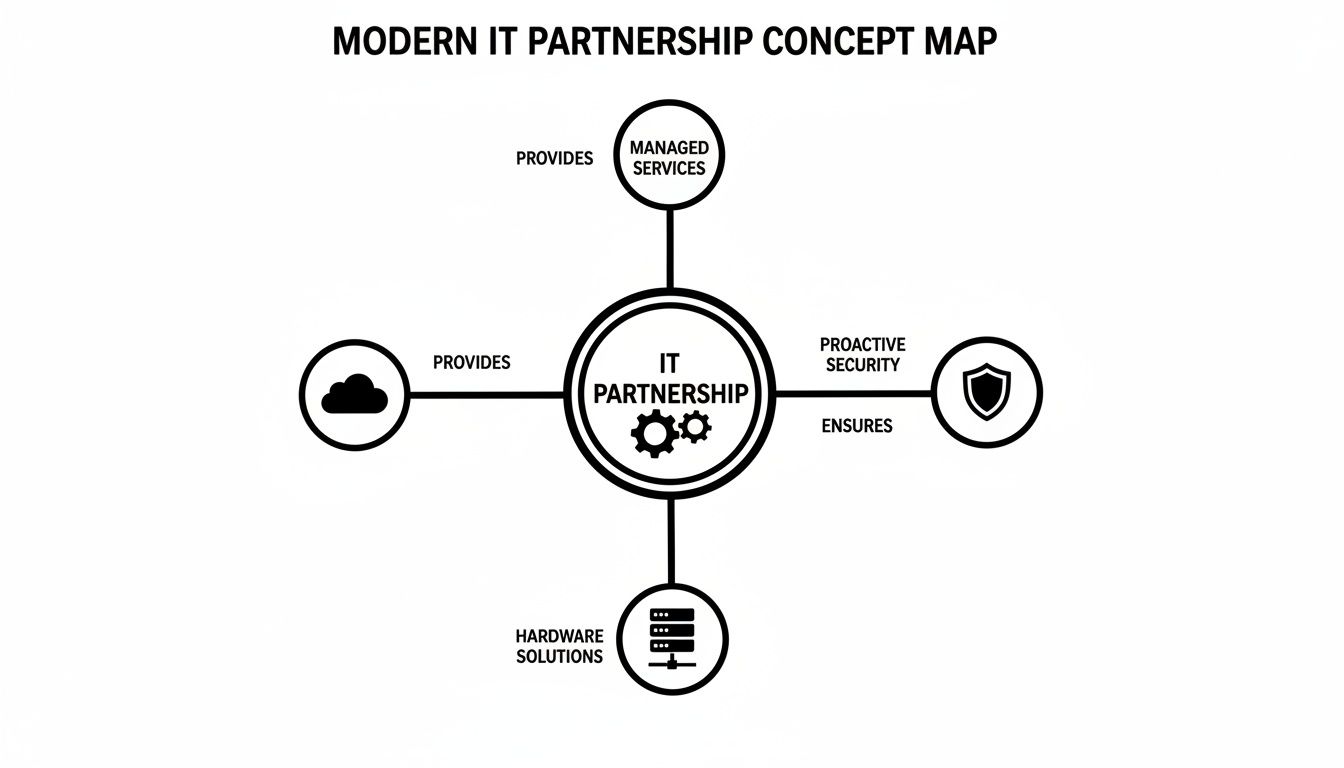
As you can see, a solid IT strategy isn't about picking one thing. It's about making sure all these different parts work in harmony.
Managed IT And 24/7 Helpdesk Support
This is your always-on safety net. The old way of doing IT was waiting for something to break and then calling for help. Managed IT services flip that model on its head. It’s all about proactive monitoring—watching your systems around the clock to spot and fix tiny issues before they become full-blown disasters that shut you down.
And when something inevitably does go sideways? That's what the 24/7 helpdesk is for. An employee can't log in at 2 AM to hit a critical deadline? A key piece of software crashes right before a client presentation? Instead of grinding everything to a halt, a quick call gets them an expert who can solve the problem right then and there.
Practical Example: A BPO agent is on an important call in the middle of a night shift, and their computer suddenly freezes. With 24/7 helpdesk support, they're not left stranded. They get remote assistance within minutes, their system is safely rebooted, and they're back on the line with the customer without missing a beat or damaging service metrics.
Hardware Leasing And Rent-To-Own Options
Let's be honest: good technology is expensive. For a growing business, dropping a huge amount of cash on new computers and servers can be a massive roadblock. This is where hardware leasing and rent-to-own models completely change the game. You get the latest, most reliable equipment without the crippling upfront cost.
This approach is a lifesaver for businesses that scale up and down, like BPOs with project-based hiring or startups in a growth spurt. It turns a giant capital expense into a predictable monthly operational cost. That frees up your cash for things that actually grow the business, like marketing or bringing in new talent.
By leasing hardware, a business can equip its team with reliable, up-to-date technology while preserving cash flow. This financial flexibility is a major strategic advantage for startups and SMEs in the Philippines.
Practical Example: A new call centre lands a huge contract, but they need to hire and equip 100 new agents in just one month. Buying 100 new workstations outright would drain their bank account. Instead, they use a rent-to-own plan to get all the PCs and monitors deployed fast, paying for everything through a manageable monthly fee.
Network Design And Security Hardening
Your network is the central nervous system of your business. If it's slow or unreliable, everything suffers. Proper network and Wi-Fi design is about more than just plugging in a router; it's about strategically planning where to place access points and how to manage traffic to eliminate those frustrating dead zones and slow speeds. And a critical, often overlooked part of this is the physical wiring itself; a clean office cubicle power pole setup is foundational to a reliable network.
Security hardening is the other side of that coin. It turns your network from an open door into a fortress. Instead of just cleaning up after an attack, this proactive service involves configuring firewalls, locking down access points, and setting up smart rules to block threats before they ever get in. In today's world, this isn’t optional—it’s essential. Of course, even with the best defences, you need a recovery plan. We dive deeper into that topic by exploring different https://redchipcomputers.com/types-of-backup/.
Practical Example: A boutique hotel keeps getting bad reviews because of spotty Wi-Fi. An IT partner comes in, maps out the entire property, and installs new access points to ensure strong, fast coverage in every single room. At the same time, they create a separate, secure network just for guests, completely isolating it from the hotel's internal systems to protect sensitive operational data. The result? Happier guests and a much safer business.
Why So Many Businesses Are Making the Switch to Managed IT Support
The old-school approach of keeping a full-time IT team on the payroll is starting to feel outdated, especially for growing companies. Why? Because today’s businesses don’t just need someone to fix a computer when it breaks. They need a smart, forward-thinking tech strategy that stops problems before they start, tightens up security, and fuels growth without draining the budget.
This is exactly why so many organisations are moving to managed it services and support. It’s not just a trend; it's a fundamental business decision that delivers real, measurable results. Instead of treating IT like another overhead cost, smart leaders are using it as a powerful tool to work more efficiently and get a leg up on the competition. Let’s break down the key reasons why this has become the go-to choice.
Predictable Costs and Better Efficiency
One of the biggest headaches of having an in-house IT department is the unpredictable spending. One month, everything's fine. The next, a critical server dies, and you’re suddenly facing a massive, unplanned repair bill that completely wrecks your budget. Managed IT services put an end to that financial rollercoaster.
With a managed provider, you pay a consistent, flat monthly fee for all-inclusive support. This simple shift turns unpredictable capital spending into a stable, manageable operational expense, which makes budgeting infinitely easier. For example, a company might pay a fixed P50,000 per month for complete IT coverage, rather than P20,000 one month and a shocking P200,000 the next when a server fails. It's a huge reason why SMEs in the Philippines are embracing modern ICT solutions, using outcome-based managed services to sidestep those huge upfront costs. You can learn more about this market shift and see how IT security is projected to grow in the Philippines.
Access to a Deep Bench of Experts
Let's be realistic: hiring one senior IT guy who knows a bit of everything is incredibly expensive. And even then, nobody can be a master of all trades—from cybersecurity and cloud systems to network engineering and disaster recovery. This is where a managed service partner has a clear advantage.
Instead of just one person, you get an entire team of specialists for less than the cost of a single senior hire.
- Cybersecurity Specialists: These folks live and breathe digital defence, staying on top of the latest threats so you don't have to. For example, they are the ones who implement advanced email filtering to stop phishing attacks before they reach your employees' inboxes.
- Network Engineers: They’re the architects who build and maintain the digital backbone that keeps your team online and productive. They design the office Wi-Fi so there are no dead spots and ensure your internet connection is fast and reliable.
- Cloud Architects: They are your guides for moving and managing your data and apps in the cloud, ensuring everything is secure and efficient. For instance, they can help you migrate your company files from an old on-site server to a secure cloud platform like Microsoft 365.
This collective brainpower means that no matter what technical challenge you face, there’s a genuine expert ready to tackle it.
You’re not just hiring a helpdesk; you're gaining a virtual Chief Information Officer (CIO) and a full department of specialists dedicated to your success. That level of expertise is simply out of reach for most small and medium-sized businesses through direct hiring.
Proactive Security in a Dangerous World
In the past, many companies treated IT security as an afterthought—something you only dealt with after a breach. In today's world, where a single ransomware attack can shut down your entire operation, that reactive mindset is a recipe for disaster. Managed IT support completely flips the script by focusing on proactive prevention.
Your IT partner isn't just waiting for an alarm to go off. They are constantly working behind the scenes to strengthen your defences. They roll out multiple layers of security, monitor your network 24/7 for anything suspicious, and make sure every system is patched and updated to close the door on new vulnerabilities. A practical example is automated software patching. While you work, your IT partner ensures that critical security updates for Windows or Adobe are installed on all company computers overnight, closing security holes before hackers can exploit them. This constant vigilance is what keeps your data safe and your business running.
Scale Up (or Down) as Your Business Grows
For a startup or a BPO in a growth spurt, expansion is exciting but also a logistical nightmare. How do you get 50 new employees up and running without bringing your current systems—or your support staff—to a grinding halt? This is where managed IT is a game-changer.
An IT partner can scale their services to match your needs almost instantly. Need to set up 100 new workstations for a big project? They'll handle everything from buying the gear to getting it on each desk. Opening a new branch office? They'll design and build the entire network from the ground up. For example, when you hire five new salespeople, your IT partner can have their laptops configured, email accounts created, and software installed before their first day, ensuring they are productive immediately. This agility frees you to focus on what you do best—growing your business—without getting bogged down by the technical headaches. Find out how our managed services consulting can help your business grow without the friction.
How To Choose The Right IT Partner

Picking a provider for your it services and support is one of the most significant decisions you'll make. This isn't just about finding someone to fix a computer when it breaks; you're bringing on a partner and trusting them with the very technology that keeps your business running.
The right partner acts like a strategic part of your team, driving efficiency and growth. The wrong one? They become a source of constant downtime, headaches, and lost productivity.
To get it right, you have to look past the sales pitch and the price tag. You need a solid way to vet potential partners to make sure they actually fit your business goals, your day-to-day needs, and your plans for the future. It’s all about asking the right questions—the kind that cut through the fluff and reveal what they can really do for you.
Start with Their Service Level Agreements
Think of a Service Level Agreement (SLA) as a contract of promises. It’s a formal document that lays out the exact, measurable standards your provider is committing to. This includes critical details like guaranteed response times and how quickly they’ll resolve different types of issues. Without a concrete SLA, you’re just hoping for good service instead of guaranteeing it.
Don't settle for vague assurances like "we're fast." You need to get into the specifics. What’s their guaranteed response time for a true emergency, like your main server going offline, compared to a simple request like a password reset? A proper SLA will have clear priority levels with different time commitments for each.
For example, imagine your entire BPO floor loses its internet connection right at the start of a peak shift. Your SLA should clearly state that a critical P1 (Priority 1) issue like this gets an initial response within 15 minutes, with an engineer actively working on it in under an hour. That’s the kind of clarity you need.
Dig into Their Track Record and Ability to Scale
Your business is going to change, and your IT partner needs to be able to keep up. Can they handle your growth? You need to know if they can scale their services—both up and down—as your needs evolve. What happens when you open a new branch or hire a dozen new people? You need a partner who can take that in stride.
The best way to know what they can do in the future is to look at what they’ve done in the past. Ask for proof. A reliable provider will have case studies and real client stories ready to share, especially from businesses similar to yours.
A provider’s proven track record is your best indicator of future performance. If they can show you how they successfully managed a complex, large-scale deployment under pressure, you can be more confident in their ability to handle your own challenges.
Here are a few questions you should absolutely be asking:
- Can you walk me through a network deployment you managed for a company our size?
- How have you supported a client through a period of rapid growth, like onboarding 50 new staff in one quarter?
- What's the largest number of workstations you've rolled out for a single project?
A partner worth their salt will have solid, evidence-backed answers for you.
Before you make your final decision, it's crucial to have a systematic way to compare your options. This checklist will help you ask the right questions and evaluate potential IT partners on the criteria that truly matter for your business's stability and growth.
IT Provider Evaluation Checklist
| Evaluation Criteria | What to Ask | Why It Matters |
|---|---|---|
| Service Level Agreement (SLA) | Can I see your SLA document? What are your guaranteed response and resolution times for critical (P1) and standard (P2/P3) issues? | This is their written promise. Vague SLAs mean unpredictable service. Concrete numbers hold them accountable when you need them most. |
| Proven Experience | Can you provide 2-3 case studies or references from businesses in my industry or of a similar size? | Anyone can say they're an expert. Proof of past success, especially with businesses like yours, is the only thing that counts. |
| Scalability | How do you handle sudden increases in support needs, like a new office or a major hiring push? | Your business won't stay the same size forever. You need a partner who can grow with you, not hold you back. |
| On-Site vs. Remote Support | What's your process for on-site support? How quickly can you have a technician at our office for a physical hardware issue? | Remote support is great for speed, but some problems require hands-on help. A lack of on-site capability is a major red flag. |
| Pricing Transparency | Can you provide a detailed breakdown of your pricing? Are there any one-time setup fees, after-hours charges, or hidden costs I should know about? | You need predictable costs to budget effectively. Hidden fees and confusing invoices can destroy a good partnership. |
| Security Expertise | What is your approach to cybersecurity? What specific measures do you implement to protect your clients from threats like ransomware? | In today's environment, IT support is security support. A provider who is weak on security puts your entire business at risk. |
Using this checklist will give you a clear, side-by-side comparison, making it much easier to see which provider truly aligns with your operational needs and long-term vision.
Analyse Their Support and Pricing Models
Great IT support is flexible. You might need an immediate fix done remotely, but other times you'll need a technician physically on-site. Your partner should offer both remote support for speed and on-site assistance for when hands-on help is required. Make sure you understand exactly how their support system works.
Just as important is how they charge for it. Hidden fees and complicated invoices are a recipe for frustration. Look for a provider with clear, simple pricing models that you can actually understand and budget for.
The most common models you'll see are:
- Per-Device: A set monthly fee for every computer, server, or network device they manage.
- Per-User: One flat fee for each of your employees, which covers all the tech they use.
- Tiered Plans: Pre-packaged bundles that offer different levels of service at set price points.
Think about which model makes the most sense for you. If your team shares a lot of devices, a per-user model is often more cost-effective. But if each person has multiple devices, a per-device model might work out better. A good partner will help you figure out the most logical and budget-friendly option for your specific setup.
Real-World Examples Of IT Support In Action

It’s one thing to talk about theory and checklists, but the real proof of great IT services and support is seeing it solve actual business problems. How does a technology solution translate into growth? How does it fix those frustrating operational headaches that hold you back?
Let's get practical. Here are a couple of stories that show exactly how the right IT partner can make a tangible difference. We’ll look at the problem, the specific solution we put in place, and the results that followed. This is where IT stops being just another expense and starts becoming a powerful tool for success.
Story 1: The BPO Expansion Challenge
The Problem: A rapidly growing BPO in the Philippines had just signed a huge new client. The catch? They needed to get a brand-new 200-seat office up and running in less than a month. The immediate roadblock was financial—the massive upfront cost of buying 200 new workstations and building out the entire network infrastructure was simply not feasible on such a short timeline.
Our Solution: Instead of forcing a massive capital purchase, we set them up with a flexible hardware rent-to-own programme for all 200 PCs. At the same time, our project team got to work designing and deploying the complete network infrastructure. We handled everything from the structured cabling in the walls to configuring the firewalls, getting the entire site ready in under two weeks.
The Result: The BPO launched their new office on schedule and, crucially, within budget. They had zero capital expenditure on hardware, which freed up their cash flow to focus on hiring and training their new agents. The site went live with zero downtime, allowing them to hit the ground running, meet their client obligations, and start generating revenue from day one.
This is a classic example of how modern IT support solves business challenges, not just technical tickets. By shifting a huge capital expense to a predictable operational cost, the BPO was able to grab a growth opportunity that might have otherwise passed them by.
This kind of agile IT support is more critical than ever. The Philippine IT-BPM sector, a major engine for our economy, is on track to employ 1.82 million people and bring in USD 38 billion in revenue. Add to that a local data centre market projected to grow from USD 735 million to USD 2.48 billion by 2031, and you can see the enormous demand for IT partners who can deliver. If you're interested in this landscape, you can learn more about how IT services in the Philippines spur development.
Story 2: The Hotel Wi-Fi Overhaul
The Problem: A beautiful boutique hotel was getting hammered by negative online reviews. The culprit was always the same: slow, unreliable Wi-Fi. Guests were fed up with dead spots in their rooms and dropped connections in the lobby. It was directly hurting their satisfaction scores and killing any chance of repeat business.
Our Solution: First, our network engineers performed a detailed on-site survey. We walked the entire property, mapping out the building's layout to pinpoint signal weaknesses and coverage gaps. Based on that data, we designed and installed a robust, secure, managed Wi-Fi network using enterprise-grade access points. This ensured strong, seamless coverage everywhere—from guest rooms to the function halls. We also set up a separate guest network to keep their internal operational data safe.
The Result: The change was immediate. Within a month of the new network going live, negative comments about Wi-Fi vanished from their reviews. More importantly, guest satisfaction scores specifically related to internet connectivity shot up by an incredible 40%. This wasn't just a technical fix; it was a direct investment in the guest experience that improved their online ratings and strengthened their brand.
Got Questions About IT Support? We Have Answers.
Bringing on an IT partner is a big decision. You're handing over a critical piece of your business to an outside team, so it's only natural to have a few questions. You need to feel confident and clear about what you're getting into.
To help with that, we've put together some of the most common questions we hear from businesses just like yours. Our goal is to give you straightforward answers, so you know exactly what to expect.
What Does Managed IT Support Actually Cost?
This is usually the first question on every business owner’s mind, and for good reason. The good news is that unlike the old "break-fix" model where you'd get hit with a surprise bill, managed services are all about predictable costs. The final price tag depends on a few things, but it’s almost always a flat, monthly fee.
Most providers structure their pricing in one of two ways:
- Per-User Model: You pay a set fee each month for every employee. This is a great fit for companies where people use multiple devices (like a laptop, a desktop, and a phone), since it covers the person, not just the hardware.
- Per-Device Model: Here, you pay a fixed rate for each piece of equipment being managed—think servers, desktops, or firewalls. This model works well for places with fewer staff but more complex or critical hardware.
Of course, the complexity of your needs plays a big part. A business that just needs basic helpdesk support will pay less than one that requires 24/7 server monitoring, advanced cybersecurity, and regular on-site visits.
Think of it like a mobile phone plan. You pick the package that has the right amount of data and calls for your needs. With managed IT, you're doing the same thing—choosing a plan that matches your team size, operational needs, and security priorities. The result is a predictable monthly bill with no surprises.
How Fast Will You Respond When Something Breaks?
When your systems are down, time is money. The answer to this question shouldn't be a vague promise; it should be written down in your provider's Service Level Agreement (SLA). This is a formal contract that guarantees specific response and resolution times.
A good provider will always categorise problems by how serious they are. For example:
- Critical (Priority 1) Issues: The whole office is offline, or a server has crashed. This is an all-hands-on-deck situation, and you should expect a response in under 15 minutes.
- Major (Priority 2) Issues: A key application isn't working for one department, slowing everyone down. A response within the hour is a reasonable expectation.
- Minor (Priority 3) Issues: One person can't connect to a printer. It's annoying, but not a business-stopping event. A response within a few business hours is standard.
Here’s a real-world example: Imagine a BPO’s phone system goes dead during peak calling hours. That’s a Priority 1 emergency. The SLA should guarantee that an engineer isn't just sending an automated email—they are actively starting to fix the problem immediately.
How Do I Know My Business Data Is Safe With You?
Trusting an outside company with your data can feel a little unnerving. Security should be the absolute top priority, and any professional IT partner will have a multi-layered plan to protect your information.
This goes way beyond simply installing antivirus software. It’s about building a robust security posture that stops breaches before they can even happen.
Key security measures should always include:
- Proactive Network Monitoring: Using sophisticated tools to watch for any unusual activity, 24/7.
- Strong Encryption Standards: Making sure all your sensitive data is scrambled and unreadable to anyone without authorisation, whether it's sitting on a server or being sent over the internet.
- Strict Access Controls: Implementing rules to ensure that only the right people can access specific files, folders, and systems. For example, ensuring that sales staff cannot access sensitive HR files.
- Regular Security Audits: Constantly testing defences and updating them to stay ahead of new and emerging cyber threats.
The reality is that a dedicated IT partner can often provide a much higher level of security than a small business could ever manage on its own. You get enterprise-grade protection without the massive enterprise price tag.
Ready to build a technology foundation that scales with your business? The expert team at REDCHIP IT SOLUTIONS INC. provides business-ready IT services, from flexible hardware leasing to 24/7 managed support, ensuring your operations run smoothly and securely. Get a customised quote today and see how we can fuel your growth.



