At its core, a CCTV installation service isn't just about selling you cameras. It's a complete, professional solution for designing, setting up, and maintaining a video surveillance system that genuinely protects your business or home. The service covers everything from strategic camera placement and network setup to ongoing support, ensuring you have eyes on your property 24/7.
Why Go Pro with Your CCTV Installation?
Here in the Philippines, smart businesses are realizing that a few off-the-shelf cameras just don't cut it anymore. Real security goes far beyond the hardware itself; it's about intelligent system design, solid network integration, and support you can count on when you need it most.
Think of it this way: anyone can buy a pile of bricks, but you need an architect to design and build a fortress that actually stands strong. A professional installer is that security architect for your business, creating a system that proactively protects your unique space.
The Hidden Dangers of a DIY Setup
Trying to install a CCTV system yourself might seem like a good way to save money upfront, but it almost always leads to serious security flaws that can cost you dearly down the line. Without an expert's eye, businesses often create a false sense of security while leaving themselves wide open to risk.
Here are a few common pitfalls we see all the time with DIY jobs:
- Glaring Blind Spots: It's easy to stick a camera in a hotel lobby, but what about the glare from a polished floor or the dark corner by the emergency exit? A professional installer knows exactly which lens to use and where to place it to eliminate those unmonitored gaps. For example, a wide-angle dome camera might cover the lobby, but a separate bullet camera with better low-light performance is needed to properly secure the dimly lit parking entrance.
- Useless Footage: Using the wrong cables or a poorly configured network often results in choppy, pixelated, or completely lost video—especially when you need it most. A practical example is a retail store owner who discovers their footage of a shoplifter is too blurry to identify the person's face, making it worthless for a police report.
- Major Network Risks: Connecting cameras to your network without the right security measures can open a backdoor for hackers. For instance, a small business might use the default password on their NVR, allowing an unauthorized person to access their live camera feeds and potentially their entire business network.
The Professional Edge for Businesses in the Philippines
The need for high-quality surveillance is booming. The Philippine CCTV camera market was valued at USD 2,582.14 million in 2024 and is expected to skyrocket to USD 12,431.68 million by 2033, largely because businesses in urban centres understand its importance for safety and stability.
A professional CCTV service delivers a complete security solution, purpose-built for the unique challenges faced by businesses in Metro Manila and across the country. It's about getting a reliable system that actively protects your BPO, hotel, or retail chain.
A BPO, for example, needs more than just cameras at the door. They need to secure sensitive data on production floors to meet strict client privacy agreements. Likewise, a hotel needs to ensure guest safety without being intrusive. These are complexities a professional installer handles seamlessly, while also integrating with other security layers like commercial locksmith services.
This is how a simple camera setup becomes a powerful business tool. To learn more about what to look for, check out our guide on how to choose a CCTV provider in the Philippines: https://redchipcomputers.com/cctv-provider-philippines/
Choosing the Right CCTV System for Your Security Needs
Picking the right CCTV system can feel overwhelming with all the technical jargon out there. The truth is, it really just comes down to one thing: matching the technology to what you actually need to protect. Before you even think about camera models, the first step is always to understand where you're most vulnerable. A proper security threat assessments is non-negotiable—it’s what tells you exactly what you're trying to defend against.
Once you know your risks, the choice becomes much clearer. Think of it like buying a vehicle. A small neighbourhood café might just need a reliable sedan to get the job done (that's your basic analog system). But a large BPO with multiple floors needs a whole fleet of high-tech vans with GPS and live tracking (that’s an IP system). Both work perfectly for their intended purpose.
The Two Main Flavours: Analog vs. IP Systems
At its core, your choice boils down to two main types of systems: Analog and IP (Internet Protocol). Each has its place, and the best one for you depends entirely on your situation.
Analog Systems: These are the classic, tried-and-tested workhorses of the security world. They capture video and send it through a coaxial cable to a Digital Video Recorder (DVR). They're generally easier on the wallet upfront and are quite straightforward to set up, making them a great fit for smaller spots like a single retail store or a local sari-sari store. A practical example is a small coffee shop needing four cameras to monitor the entrance, cash register, and seating area. An analog system provides clear enough video for these basic needs at a very affordable price.
IP Systems: This is where modern surveillance is at. IP cameras are like tiny computers themselves, capturing crystal-clear, high-resolution video and sending it over a standard network cable to a Network Video Recorder (NVR). This digital approach gives you far better image quality, opens the door to smart features like AI analytics, and is much easier to expand as your business grows. A great example is a hotel. With an IP system, they can use analytics to see how people move through the lobby, manage queues at check-in, or get an instant alert if someone enters a restricted area after hours. That's the kind of smart security that IP systems deliver.
Comparing CCTV System Types for Your Business
To make the decision a bit easier, here’s a quick breakdown of how these systems stack up against each other.
| System Type | Best For | Key Advantages | Key Considerations |
|---|---|---|---|
| Analog | Small businesses, single-site locations, and budget-conscious installations. | Lower upfront cost, simpler setup, and reliable for basic monitoring needs. | Lower image resolution, limited features, and less scalable for future expansion. |
| IP | Growing businesses, multi-site operations, and those needing advanced features. | Superior HD/4K resolution, AI analytics, remote access, and easy scalability. | Higher initial investment and requires a stable network infrastructure. |
| Wireless | Locations where cabling is difficult or temporary surveillance is needed. | Flexible installation with no need for extensive wiring and quick to deploy. | Dependent on Wi-Fi signal strength and can be susceptible to interference or hacking. |
Ultimately, the best choice is the one that fits your operational needs and budget without compromising on the level of security you require.
Matching the Right Camera to the Right Job
Beyond the type of system, picking the right camera for each specific spot is what makes or breaks your surveillance setup. A professional installer won’t just use one type of camera everywhere; they'll create a custom blend to give you a complete, gap-free view of your property.
Here are the most common cameras you'll see and what they're built for:
Dome Cameras: Their low-profile, dome shape makes them perfect for indoor areas where you want security to be present but not intimidating. For instance, in hotel lobbies, BPO reception desks, or office spaces—they blend in while keeping a watchful eye.
Bullet Cameras: You can't miss these. Their distinct, cylindrical shape makes them highly visible, which is a powerful deterrent in itself. They're almost always weatherproof, making them the go-to choice for outdoor areas like parking lots, building perimeters, and delivery bays. A good example is mounting a bullet camera on the corner of a warehouse to clearly monitor the loading dock area 24/7.
PTZ (Pan-Tilt-Zoom) Cameras: These are your active surveillance powerhouses. A security operator can remotely control the camera to pan across a huge area, tilt up and down, and zoom in to get a closer look at something specific. A practical case is a security guard using a single PTZ camera to monitor an entire construction site, zooming in on a suspicious vehicle or an unauthorized person entering after hours.
Here in the Philippines, we're seeing a clear shift towards more advanced setups. While simple fixed cameras used to be the default, IP cameras are quickly becoming the standard, especially for how easily they can be installed in both homes and small businesses. If you're interested in the data, you can find more insights on the Philippine CCTV market on 6wresearch.com.
Key Takeaway: The best CCTV installation services don't just sell you cameras from a catalogue. They come to your site, analyse your weak points, and design a strategic mix of systems and camera types to completely cover your blind spots and meet your security goals.
Getting a handle on these basics will help you have a much more productive conversation with your security provider. You'll be able to explain what you need clearly and make sure the system you end up with is perfectly suited to protect your business.
What to Expect From a Professional Installation
Getting a professional CCTV system installed is a whole lot more than just screwing a few cameras to a wall. It’s a carefully planned project, a step-by-step process designed to give you maximum security coverage with zero guesswork. This structured approach means every angle is considered, from the initial walkthrough to the moment you take the reins of your new system.
When you understand the journey, you start to see the real value an expert brings to the table. It’s the difference between buying a box of hardware and investing in a true security asset. Each step logically builds on the last, giving you a reliable and effective surveillance solution that’s truly built for your business.
This process chart gives you a bird's-eye view of how a project goes from a security idea to a fully installed reality, ensuring everything is planned out. This is exactly what keeps professional projects on track and avoids the common headaches of a DIY attempt.
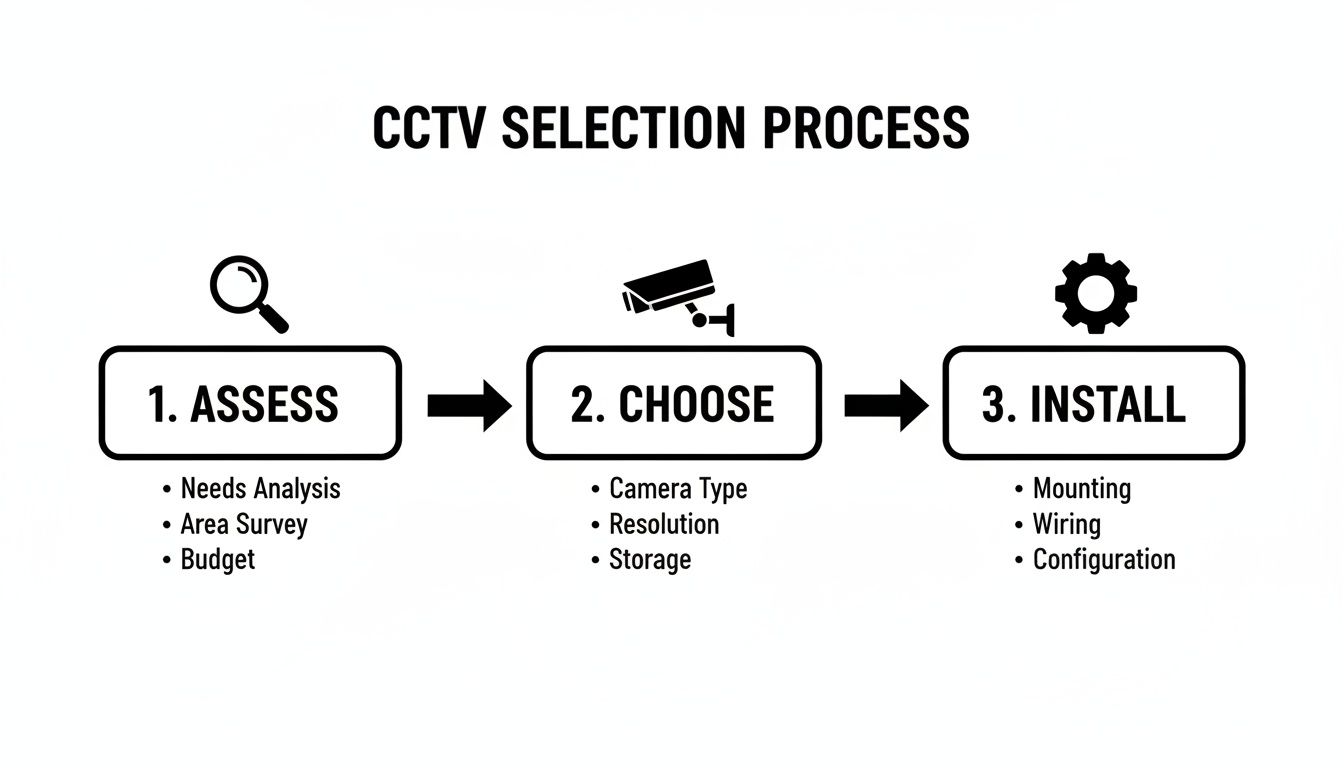
As the graphic shows, a proper installation isn't just one event. It’s a thoughtful journey that starts with truly understanding your needs. This methodical approach is what separates a professional result from an amateur one, leaving you with a system that actually protects what matters most.
Stage 1: Site Survey and Risk Assessment
Everything kicks off with a detailed site survey. Honestly, this is probably the most important stage because it lays the groundwork for the entire security system. An experienced technician will visit your property, but they aren't just looking for places to hang cameras—they’re trying to think like a burglar.
They’ll walk through your entire premises, whether it’s a busy BPO production floor or the quiet hallways of a hotel. The goal is to spot the weak points, map out high-traffic areas, identify critical entryways, and find potential blind spots that you might not even know exist.
For example, in a retail store, the technician would identify that the back alley door is a high-risk area, that the cash register needs a camera with high resolution for clear face shots, and that a blind spot exists in the high-value electronics aisle. This in-depth look is the first real step toward building a system that works for you.
Stage 2: Custom System Design and Proposal
Once the survey is done, all that information is used to craft a custom system design. This is not a generic, off-the-shelf package. Think of it as a detailed blueprint that shows the exact type, number, and placement of every single camera and component.
The proposal you receive will explain why a certain dome camera is perfect for your lobby, and why a tougher, weatherproof bullet camera is the right choice for the car park. It will calculate the storage you’ll need on your NVR based on your recording schedule and any legal requirements, and it will lay out the network infrastructure needed to make it all run smoothly.
A practical proposal would show a floor plan with camera icons, specifying that "Camera 1" is a wide-angle dome for the main office area, while "Camera 4" is an outdoor bullet camera with infrared to monitor the parking lot at night.
Stage 3: Structured Cabling and Network Prep
With the design approved, the real work begins. Proper cabling is the unsung hero of any reliable CCTV system. Cut corners here with cheap cables or a sloppy job, and you're asking for grainy video, signal loss, and a system that goes down right when you need it.
Professional installers use high-quality, structured cabling to guarantee a stable, crystal-clear connection from every camera back to the recorder. For a multi-storey hotel, this involves carefully running cables through ceilings and walls, keeping them protected and hidden. A real-world example is using plenum-rated cables in air handling spaces to meet safety codes, a detail a DIY installer might miss.
Stage 4: Camera and Recorder Installation
After the cable network is laid, the technicians get to work mounting the cameras and installing the central recorder (the DVR or NVR). This is done with absolute precision to match the exact viewing angles and coverage areas mapped out in the design phase.
Every camera is carefully positioned and focused to eliminate blind spots and maximise coverage. The recorder is typically installed in a secure, climate-controlled location like a server room or locked office to prevent tampering or theft.
Stage 5: System Configuration and Testing
With the hardware in place, it’s time to bring the system to life. The technicians will configure the NVR, set up your recording schedules, and define motion detection zones. They'll also connect the system to your network, enabling secure remote viewing from your computer or smartphone.
Then comes the testing—and it’s thorough. The feed from every single camera is checked for clarity, focus, and correct positioning. The team makes sure recordings are being saved properly and that remote access works without a hitch. For instance, they might set a motion detection zone around a sensitive filing cabinet and then walk past it to ensure it triggers a recording and sends a notification as expected.
Stage 6: Team Training and Handover
The final and most important step is making sure you and your team can actually use the system. A professional service doesn’t just install the gear and leave you with a thick manual. They provide hands-on training to show you how to view live feeds, search for and export footage, and manage the basic system settings.
A practical handover session would involve showing a store manager exactly how to find the video clip from 3:15 PM yesterday, export it to a USB drive, and provide it to the authorities if needed. This makes sure your security staff or management team feels confident running the system from day one.
Breaking Down the Cost of CCTV Installation Services
When you start thinking about professional CCTV installation services, it's tempting to just look at the camera prices. But that’s only a small part of the story. The real investment—and where you get the most value—is in the complete solution. This covers everything from the expert planning and labour to the vital hardware that keeps the whole system humming along reliably.
Looking at the full picture helps you understand that this isn't just a one-time purchase. It's a long-term security asset for your business. The final price is a blend of several key factors, all tailored to your specific needs, ensuring you get the right level of protection without paying for things you don't need.
What Really Drives the Installation Cost?
The final quote for a CCTV system is never a standard, off-the-shelf price. It’s a carefully calculated figure based on the unique layout of your property and what you want to achieve with your security. A professional installer figures all this out during the initial site survey to give you a clear and accurate proposal.
Here’s a look at the main things that shape the overall cost:
- Type and Number of Cameras: It’s a simple fact: high-resolution IP cameras with fancy features like sharp night vision or thermal imaging cost more than basic analog models. For example, a 4K PTZ camera for a warehouse might cost ten times more than a simple HD dome camera for an office hallway.
- Complexity of Your Site: There’s a world of difference between installing cameras in a simple, open-plan shop and running cables through the concrete walls and multiple floors of a BPO office or a hotel. The tougher the environment, the more labour is involved.
- Storage Needs: How much video do you need to keep? The answer determines the size and cost of your Network Video Recorder (NVR). If you need to store 30 days of continuous 4K footage from 16 cameras, you'll need a much bigger and more expensive NVR than a business that just records motion-triggered clips for a week.
- Advanced Features: Want to add powerful tools like AI-driven video analytics for recognising faces or reading license plates? These features add incredible new capabilities but will also increase the initial system cost.
The total cost reflects the entire scope of work—from strategic design and meticulous cabling to system configuration and ongoing support. It's a comprehensive service, not just a hardware sale.
Sample CCTV Installation Package Estimates
To put these factors into perspective, here are a few practical examples of what a CCTV package might look like for different businesses here in the Philippines. This table should give you a clearer idea of how costs can scale based on your needs.
| Package Type | Ideal For | Typical Components | Estimated Cost Range (PHP) |
|---|---|---|---|
| Small Retail Starter Pack | A boutique, coffee shop, or small neighbourhood clinic. | 4 HD dome cameras, a 4-channel NVR with 1TB storage, basic cabling, and professional installation. | PHP 25,000 – PHP 45,000 |
| Mid-Size Office System | A medium-sized business office or a small hotel. | 8-10 high-resolution IP cameras, a 16-channel NVR with 4TB storage, structured cabling. | PHP 80,000 – PHP 150,000 |
| Corporate Campus Solution | A large BPO campus, multi-building hotel, or a factory. | 32+ 4K IP cameras, server-based NVR with redundant storage, fibre optic cabling, and integration with access control. | PHP 500,000 and up |
These examples show that there are flexible options out there for nearly every budget. The key is to work with a professional provider who can help you design a system that not only meets your security goals today but also gives you a solid foundation to build on for the future.
Beyond Installation: The Value of Ongoing Maintenance and Support
Let’s be honest, getting your CCTV system installed feels like the finish line. But in reality, it's just the starting point. Think of your new security system like a brand-new car; you wouldn't just drive it for years without changing the oil or checking the tyres, right? The same logic applies here. Ongoing maintenance is what keeps that high-performance system running flawlessly, especially when you need it most.
Without regular check-ups, even the best systems start to falter. Dust can slowly blur a camera lens, constant vibrations can knock a critical angle out of focus, and the hard drives recording everything can simply wear out. These aren't dramatic failures; they're silent problems that create dangerous blind spots in your security.
From Reactive Fixes to Proactive Protection
For a long time, the standard approach was "break-fix." A camera goes down, a recording is missing, and then you call for help. This is a risky game to play. You usually only discover the problem after an incident has already happened—the very moment you needed that footage.
A proactive maintenance plan completely flips this script. Instead of waiting for something to break, technicians perform scheduled health checks to catch and fix issues before they become real problems.
Here are some common headaches a proper maintenance plan prevents:
- Camera Focus Drift: Day-to-day vibrations can cause a camera's focus to soften, turning clear images into blurry, useless footage. Regular tweaks keep everything sharp enough to identify faces or plate numbers.
- Hard Drive Failure: The hard drives inside your recorder are working 24/7, and they don't last forever. Proactive monitoring can spot the early warning signs, giving you time to replace a drive before you lose a single frame of critical video.
- Network Glitches: Something as simple as a loose cable, a network configuration change, or outdated firmware can knock a camera offline. Routine checks ensure every connection is solid and all software is current.
The Power of Managed CCTV Services
Managed services take proactive care to the next level. This is where your CCTV installation services provider doesn't just visit on a schedule; they actively monitor the health of your system from their own office, in real-time. If a camera starts acting up or a hard drive sends an error signal, they get an immediate alert.
Practical Example: Let's say your hotel's main entrance camera goes offline at 2 AM. With a managed service, an alert is triggered instantly. The provider can often log in remotely, reboot the camera, and fix the issue in minutes. Without it, you might not realise there was a problem until the next morning, leaving a huge gap in your security overnight.
This kind of oversight is all about maintaining maximum uptime. A 2024 study in the Province of Capiz revealed a major difference in CCTV effectiveness between government and private establishments, with private businesses often falling behind. Expert maintenance and managed services are exactly what closes this gap, bringing the reliability of systems in BPOs, hotels, and SMBs up to the standard needed for genuine security. The full research really highlights the local challenges we face.
For many businesses, the sweet spot is a mix of support strategies. We can walk you through the specifics of both preventive and corrective maintenance to design a plan that truly fits how you operate and what your budget allows.
Frequently Asked Questions About CCTV Installation
Getting into the world of CCTV installation services can feel a bit overwhelming, especially if it’s your first time. We get a lot of questions from business owners across the Philippines, so we've put together some straightforward answers to the most common ones. This should clear up any concerns you might have about the installation itself, legal stuff, and how to use the system day-to-day.
Think of this as your cheat sheet to making sure your security upgrade goes off without a hitch.
How Long Does a Typical Installation Take?
For a small office or a typical retail shop needing four to eight cameras, our team can usually get the job done in about one to two business days. That includes everything—running the cables, mounting the cameras just right, setting up the recorder, and getting you connected for remote viewing.
But remember, every building is different. The final timeline really depends on the layout and any tricky structural spots. For example, a modern office with drop ceilings is much faster to wire than an older concrete building where every cable path needs to be drilled. That’s why the site survey is so important.
Do We Need to Worry About the Data Privacy Act?
Yes, you absolutely do. Complying with Republic Act 10173, the Data Privacy Act, isn't just a good idea—it's the law for any business in the Philippines with a CCTV system. A good installer does more than just mount cameras; they should also be your partner in making sure you’re fully compliant. This is a huge part of the service and helps protect you from some serious legal headaches.
This means taking practical steps like putting up clear signs to let people know they're on camera, making sure no cameras are in private spaces like restrooms, and locking down your recorded footage so only authorised people can see it.
Can I View My Camera Feeds on My Phone?
Of course. In fact, if a system doesn't offer remote viewing, you should probably walk away. It's a standard feature on any modern IP-based CCTV system and a game-changer for business owners.
When we set everything up, our technicians will get your system securely connected to your network. We’ll then walk you through installing the mobile app on your phone or computer and make sure you’re comfortable with it. It gives you the freedom to check in on your business from anywhere, whether you’re at home or halfway around the world.
Ready to secure your business with a professionally designed and installed CCTV system? REDCHIP IT SOLUTIONS INC. provides expert security solutions tailored to the unique needs of businesses in the Philippines, from initial consultation to ongoing support. Contact us today to schedule your site survey.



