Think of cyber security less as an IT expense and more like the locks on your office doors or the alarm system protecting your inventory. It’s a fundamental business investment that protects everything you’ve built—your digital files, customer data, and financial records—from being stolen, damaged, or held for ransom. In its simplest form, a cyber security solution is any tool or process designed to guard your digital assets. For example, a basic firewall acts as a bouncer for your network, while a cloud backup system ensures you can get back on your feet after a crisis like a typhoon flooding your office.
Why Cyber Security Is a Business Necessity
In today's economy, being online isn't an option; it's how business gets done. But leaving your digital operations unprotected is like leaving your shop's front door unlocked overnight. Every piece of data you handle, from a client's personal information to a simple transaction record, has value. Just as you'd take steps to secure your physical premises, you need a solid plan to defend your digital presence.
This is especially critical for Small and Medium Businesses (SMBs) here in the Philippines. A generic, off-the-shelf security package just won't cut it anymore. The risks a BPO in Metro Manila faces with its international client data are worlds apart from those of a popular resort in Cebu managing online bookings. Your business is unique, and your security strategy needs to be too.
The Growing Digital Risk for Philippine SMBs
The massive shift to online sales, remote work, and cloud-based apps has opened up incredible growth opportunities. The downside? It's also flung the doors wide open for cybercriminals. This digital boom is driving a huge demand for better protection. In 2024, the cyber security market in the Philippines hit USD 1.30 billion, and it's expected to surge to USD 2.72 billion by 2033.
What’s pushing this growth? A combination of stricter government regulations and the hard truth that most SMBs can't find or afford the skilled security experts and advanced tools needed to keep up. You can read more about the growing Philippine cybersecurity market on industryreportmenafn.wordpress.com.
This is precisely where having the right partner makes all the difference. Instead of getting bogged down in complex tech, you can lean on experts to build a security plan that fits your specific local challenges and grows right alongside your business.
Matching Threats with the Right Defenses
The first step in building a strong defence is knowing what you're up against. It’s about connecting a specific threat to the right solution, so you're not just buying software but actively solving a real-world business risk.
A strong cyber security posture isn’t about eliminating every single risk—that’s impossible. It’s about managing risk intelligently. It means knowing what your most important assets are and focusing your efforts on protecting them to keep your business running and maintain your customers' trust.
To make this clearer, it helps to see which tools counter which threats. The table below maps common business risks to the primary cyber security solutions designed to handle them, giving you a practical look at how these defences function.
Common Business Threats and Matching Cyber Security Solutions
| Business Threat | Primary Cyber Security Solution | Example Scenario |
|---|---|---|
| Phishing & Email Scams | Email Security | An employee at a logistics company receives a fake LBC tracking notification. Clicking the link installs malware that steals their login credentials. |
| Ransomware & Malware | Endpoint Security & Backups | A malicious file downloaded from an unverified website encrypts all company data on a shared drive, demanding a Bitcoin payment to unlock it. |
| Unauthorised Network Access | Network Security (Firewall) | A hacker from outside the country scans for open ports on your office network, attempting to gain access to your accounting server's financial records. |
| Data Theft by Ex-Employee | Identity & Access Management | A recently resigned sales agent uses their old login to access and download the company's entire client list to take to their new job. |
| Data Loss from Hardware Failure | Backup & Disaster Recovery | A critical server overheats and fails during a brownout, but operations are quickly restored from a recent, secure backup with minimal downtime. |
Seeing these scenarios laid out makes it obvious that a single layer of protection is never enough. A smart strategy combines different solutions to create a comprehensive defence that addresses the specific ways your business could be targeted.
Understanding Your Core Security Defences
Think of your business's security like protecting a physical building. You wouldn't just rely on a locked front door, would you? You’d have security cameras, keycard access for sensitive areas, and a clear plan for what to do in an emergency. Your digital assets—all your data, your network, and your computer systems—need that same kind of layered defence to be properly protected.
Each layer, or security control, is built to stop a specific type of threat. Once you understand these core defences, you'll see how a complete security strategy comes together, piece by piece, to guard what’s most valuable to your business.
This diagram breaks down how a business's digital assets are connected, showing the key areas that need protection.
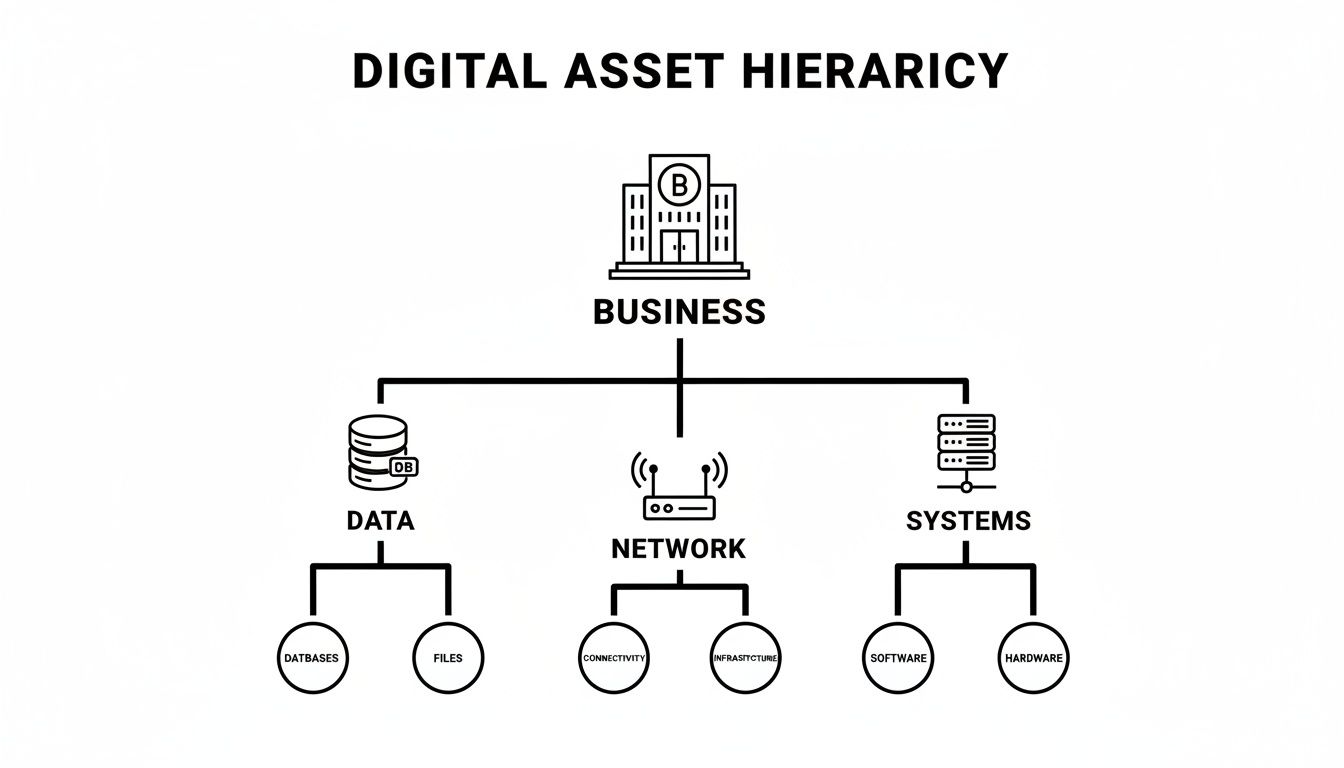
As you can see, your day-to-day operations hinge on the security of these fundamental components. Each one needs its own specialised protection.
Network Security: The Digital Gatekeeper
Your business network is the main entrance to your entire digital office. Network security, primarily managed by a firewall, acts as your digital gatekeeper. It stands guard, inspecting every bit of traffic coming in and going out to block anything that looks suspicious or unauthorised.
Practical Example: Imagine a BPO in Manila that handles sensitive client data from overseas. A weak or poorly configured firewall is like leaving the front gate unlocked and unguarded. It's an open invitation for hackers to walk right in and access confidential information, which could lead to devastating financial and reputational damage.
Endpoint Security: Shielding Every Device
Endpoints are all the devices connected to your network—laptops, desktops, even mobile phones. Endpoint security solutions are the personal bodyguards for each of these devices, which are often the weakest links in your company’s defences.
Practical Example: Think about a sales team working from various locations across the Philippines. Each team member connects to public Wi-Fi in coffee shops. A good endpoint solution ensures that even if a team member accidentally clicks on a malicious link while using an unsecured network, the software on their device can stop and neutralise the threat before it can spread across the entire company network.
Identity and Access Management: The Right Keys for the Right People
Identity and Access Management (IAM) is your digital keycard system. Its job is to make sure employees can only access the specific data and systems they absolutely need to do their jobs. This is based on a simple but powerful idea called the "principle of least privilege."
An IAM system is crucial for stopping threats from both the outside and the inside. It's not just about blocking hackers; it's about ensuring an accidental click from a well-meaning employee doesn't expose sensitive data they never should have had access to in the first place.
Practical Example: A hotel receptionist’s login should get them into the booking system but not the hotel's financial records in the accounting software. This simple control drastically minimises the potential damage if their account is ever compromised through a phishing scam. A critical, and often forgotten, part of this is the growing importance of data security in IT asset disposition when you retire old devices.
Email Security: Your Frontline Defence Against Deception
Believe it or not, email is still the number one way cybercriminals deliver malware and launch phishing attacks. Email security solutions work by scanning all your company's incoming and outgoing messages, attachments, and links to filter out spam, viruses, and clever scams designed to steal login details.
Practical Example: Your finance department gets an email that looks exactly like it's from a trusted supplier, asking for an urgent payment to a new bank account. Without strong email security to flag the suspicious link and sender, an employee might fall for the trick. Once the payment is sent, the money is gone before anyone realises it's a scam.
Backup and Disaster Recovery: The Ultimate Safety Net
Let's be realistic: no security system is 100% foolproof. When something does go wrong—whether it's a ransomware attack, a hardware failure, or even a natural disaster—Backup and Disaster Recovery (BDR) is your ultimate safety net. It’s all about having a recent, secure copy of your data that you can restore quickly.
Practical Example: For a retail shop in Quezon City, their point-of-sale (POS) system holds all sales and inventory data. If the system crashes, every minute of downtime is a minute of lost sales. A solid BDR plan means they can get their systems and data restored to a new machine within an hour, keeping disruption and financial losses to a minimum.
Securing Your Business Operations in the Cloud
Moving to the cloud offers fantastic perks like lower costs and the agility to grow on a whim. But here’s something many business owners miss: just moving your systems online doesn't automatically secure them. It’s like getting the keys to a brand-new, high-tech office but forgetting to install an alarm system or decide who gets a keycard.
The cloud has its own unique security quirks, and every business owner in the Philippines needs to get to grips with them. We're not talking about super-complex technical problems here; often, it’s the simple oversights that lead to the biggest headaches.
This shift to the cloud isn't just a passing trend; it's how business gets done now. In fact, cloud security dominated the Philippine cyber security market in 2024, pulling in USD 269.95 million, which is over 60% of the entire market. As more companies ditch their old on-site servers, that number is only set to climb. You can dive deeper into the growing Philippines cybersecurity market on databridgemarketresearch.com.
The Real Risks of Moving to the Cloud
You might be surprised to learn that most cloud security breaches aren't the work of sophisticated hackers cracking impossible codes. The real culprits are usually far more mundane: misconfigurations and weak access controls. Think of these as the digital equivalent of leaving a window unlocked or the key under the doormat.
Let's look at a practical example. Imagine a logistics company here in the Philippines using a cloud app to manage its delivery fleet. The system holds a trove of sensitive data—driver details, delivery routes, customer addresses.
Here's how easily things can go wrong:
- Misconfigured Cloud Storage: An IT team member accidentally sets the cloud storage bucket containing customer data to "public" instead of "private" while trying to share a single file. It’s a single click, but it exposes the personal information of thousands of customers to the entire internet.
- Weak Access Controls: A junior employee is given full "admin" access to everything "just in case they need it." Trying to be helpful, they might accidentally delete a vital configuration file, knocking the entire fleet management system offline right in the middle of a busy delivery day.
These aren't scare tactics; scenarios like this play out all the time. It highlights a crucial point: securing your cloud environment is a partnership—a shared responsibility between you and your cloud provider.
Taking Control with Cloud Security Solutions
To head off these kinds of disasters, you need security tools built specifically for the cloud. They do more than just build a wall; they give you a bird's-eye view and hands-on control over your cloud setup, making sure it’s configured correctly and stays that way.
Cloud security isn't about locking your data in an unusable vault. It's about building a safe, organised digital workspace where your team can be productive without putting the business on the line. The goal is to weave security into your daily cloud operations, not make it a roadblock.
Two solutions are absolutely critical for tackling these common challenges: Cloud Security Posture Management (CSPM) and secure configuration services.
- Cloud Security Posture Management (CSPM): Think of CSPM as your 24/7 automated security guard, constantly patrolling your cloud environment. For example, it can automatically detect if a storage bucket is made public and send an immediate alert, allowing you to fix the issue in minutes, not days.
- Secure Configuration and Hardening: This is all about actively strengthening your cloud services from the ground up. It means turning off features you don't need, setting up strict access rules, and making sure every setting follows security best practices. For example, for a company using Microsoft 365, this involves disabling old, insecure login methods and enforcing multi-factor authentication for all users.
How to Choose the Right Cyber Security Solutions
Figuring out which cyber security solutions to get can feel like a mammoth task, especially when you’re watching every peso. The secret isn't about buying every flashy tool on the market. It’s about smart investing—putting your money where it will actually protect your biggest vulnerabilities.
This all starts with a simple question: What are our digital crown jewels? If you run an e-commerce shop, it’s probably your customer database and payment system. For an architectural firm, it’s those priceless proprietary design files. Pinpointing these critical assets is the only way to build a defence that genuinely matters.
Start With a Risk-Based Approach
Before you even start window-shopping for security products, you need to get a clear picture of your unique weak spots. A risk-based approach is all about prioritising. It forces you to focus on the threats that could do the most catastrophic damage to your specific business.
This isn’t just a technical exercise; it’s a core business strategy. When you map potential threats directly to your most valuable assets, you can make decisions based on solid reasoning, not just guesswork. This way, your security budget goes into real protection, not just ticking boxes on a checklist.
The most common trap we see is businesses buying a security tool because it's popular, not because it solves a problem they actually have. A proper risk assessment flips this on its head. It aligns your security spending with your real-world business needs, cutting waste and delivering genuine protection.
Practical Example: A small medical clinic holding sensitive patient records must prioritise data encryption and strict access controls to comply with the Data Privacy Act. A manufacturing plant, on the other hand, might be far more concerned with network security to shield its industrial control systems and production lines from being shut down by a cyberattack.
Key Criteria For Choosing a Security Partner
Once you’ve got your priorities straight, the next challenge is finding the right partner to bring your security plan to life. The technology itself is only half the story. The expertise and support behind it are what make all the difference, especially in the Philippines, where finding skilled IT talent can be tough.
When you're sizing up a potential provider, keep these critical points in mind:
- Local Support and Understanding: Does the partner get the local business landscape? For example, do they understand the connectivity challenges outside of major cities or the specific compliance needs for Philippine businesses? A team that understands these challenges can offer far more relevant and responsive support.
- Scalability: Can the solutions grow with you? You don’t want to be forced into a costly, complete overhaul the moment your business expands from one branch to five.
- Seamless Integration: New tools have to play nice with your existing systems. The last thing you want is for your new "solution" to create more security gaps or operational headaches.
Finding a good partner is a make-or-break decision. You can learn more about what to look for in our guide on choosing a cyber security firm.
Smart Financial Models For SMBs
Let’s be honest: one of the biggest roadblocks for SMBs is the steep upfront cost of security hardware and software. This is where modern financial models like leasing and rent-to-own are complete game-changers. They transform a massive capital expense (CAPEX) into a predictable, manageable operational expense (OPEX).
This approach puts top-tier security within reach without torpedoing your cash flow. You get the protection you desperately need right now and pay for it through manageable monthly instalments. For any growing business, preserving capital for expansion is crucial, and this model makes it possible. As you weigh your options, take a look at these Top Cybersecurity Solutions for Small Business to see what's out there.
The value here goes well beyond just the finances. This model often bundles in access to a 24/7 helpdesk, giving you an immediate lifeline to experts when you need it most. For a business that can't afford a full-time, in-house security team, this is huge. It’s no surprise this model is gaining ground, with SMEs projected to drive a 10.05% CAGR in the Philippine cyber security market, even with tight budgets. You can explore more insights on the Philippine cybersecurity market at mordorintelligence.com.
Navigating Philippine Data Privacy and Compliance
It's easy to think of cyber security as just a tech problem, but here in the Philippines, it's a legal one, too. The law is clear: businesses of all sizes have a duty to protect the personal information they handle. If you don't, you're not just taking a security risk—you're breaking the law, and the consequences can be severe.
The cornerstone of this responsibility is the Data Privacy Act of 2012 (R.A. 10173). This law lays down the rules of the road for how any business, big or small, must manage the personal data of its customers, employees, and partners. If you collect so much as a name and an email address, this law applies to you.
What the Data Privacy Act Really Means for Your Business
At its heart, the Data Privacy Act operates on a straightforward principle: if someone entrusts you with their data, you must protect it. This isn't a vague suggestion; it means you need to have specific security measures in place to stop that information from being lost, stolen, or abused. Think of it as a legal requirement to put solid locks on your digital filing cabinets.
For any SMB, this translates directly into having the right cyber security solutions. These tools are no longer nice-to-haves; they are a fundamental part of your legal obligation to do business in the Philippines.
The Data Privacy Act shifts cyber security from being an IT concern to a core business compliance issue. It legally binds you to implement “reasonable and appropriate” security measures, making things like firewalls, encryption, and secure backups non-negotiable parts of your legal duty.
Let's look at how this plays out in the real world.
Practical Example 1: The Dental Clinic
Imagine a dental clinic in Makati. It stores highly sensitive patient files—medical histories, contact details, the works. The Data Privacy Act means that clinic must have endpoint security on its computers and use encrypted backups. A basic antivirus program just won't cut it anymore when you're protecting that kind of information from a ransomware attack or an insider threat.Practical Example 2: The Online Retailer
Consider an e-commerce shop based in Cebu selling handmade crafts. They collect customer names, addresses, and payment details with every single order. The law demands that they secure their website and network with a properly configured firewall. They also need strict access controls so that only authorised staff can handle that data, preventing it from being stolen by hackers.
The Real Cost of Getting It Wrong
Ignoring these legal duties can hit your business hard. The penalties under the Data Privacy Act are no joke and can include massive fines that could easily put an SMB out of business. We're talking fines of up to ₱5 million, and in serious cases, company officers could even face prison time.
But the financial hit is only part of the story. The damage to your reputation after a data breach can be far more destructive. Customer trust, once lost, is incredibly difficult to win back. People need to know their information is safe with you.
This is exactly why investing in proper cyber security isn't an expense—it's an essential cost of doing business. It’s about more than just avoiding fines; it’s about building a trustworthy company that can operate with confidence. In today's economy, strong security is your license to operate.
Your Actionable Cyber Security Checklist
Alright, let's turn all this theory into action. Knowing about cyber security is one thing, but building a solid defence for your business requires a clear, step-by-step plan. This checklist breaks down everything we've talked about into a simple roadmap, helping you move from just being aware of the risks to actively protecting your company.
Think of this as your starting point for building a security foundation that actually works.

Follow these steps to guide your efforts. We’ll tackle the most critical areas first, so you can build momentum and see real improvements without feeling overwhelmed.
Stage 1: Foundational Assessment
First things first: you need to know what you're working with. This stage is all about understanding what you have, where it is, and where your biggest vulnerabilities are. After all, you can't protect what you don't know you have.
Identify Your Crown Jewels: Pinpoint the information that is absolutely vital to your business. Is it your customer database? Your financial records? Maybe it's your unique product designs. Practical Example: For a small accounting firm, this would be their clients' tax records and financial statements stored on a local server.
Honestly Assess Your Current Gaps: Take a simple, hard look at your existing defences. Do all employee laptops have up-to-date security software? Is your office Wi-Fi locked down with a strong password, or is it still the default one from the box? Practical Example: Realizing that the guest Wi-Fi network has no password and is connected to the same network as the company's POS system is a critical gap.
Map Out Your Digital Footprint: Create a basic list of all your hardware and software. This means servers, employee computers, cloud services like Microsoft 365, and any other business-specific applications. You need to know what's on your network to secure it properly.
Stage 2: Core Implementation
Now that you have a clear picture of your assets and risks, it’s time to put some fundamental protections in place. These are the non-negotiable security layers every single business needs.
Deploy the Essentials: Your immediate priority is getting a business-grade firewall at the edge of your network and reliable endpoint protection (think advanced antivirus) on every single device. These are the digital locks and security guards for your business.
Set Up a Solid Backup System: Don't wait for a disaster to happen. Set up an automated, regular backup process for all your critical data. Crucially, test your backups every now and then to make sure you can actually restore your files when you need them most. A backup you can't restore is just a waste of space.
Create an Incident Response Plan: What do you do the moment you suspect you've been hacked? A simple, one-page plan that outlines who to call (your IT provider) and what immediate steps to take (like disconnecting the affected computer from the network) can drastically reduce the damage.
An incident response plan isn't some massive, technical document. It’s a clear, calm guide for a crisis, ensuring your team knows exactly what to do to contain a threat and get the business back on its feet.
Stage 3: Strategic Next Steps
Once your core defences are in place, you can start thinking bigger and planning for the long term.
- Schedule a Professional Consultation: The most effective security isn't one-size-fits-all; it’s tailored to your unique situation. Bringing in experts for a proper risk assessment gives you a customised strategy that ensures your security spending is directly protecting your most important business goals.
This checklist gives you the clarity to take confident, decisive action. By following these steps, you can start turning cyber security from a source of anxiety into a genuine competitive advantage for your business.
Frequently Asked Questions
When it comes to cybersecurity, it's easy to feel overwhelmed. We get it. Here are some plain-English answers to the questions we hear most often from business owners just like you across the Philippines.
How Much Should My Small Business Budget for Cyber Security?
There’s no one-size-fits-all price tag, but the smartest move is to shift your mindset. Stop thinking of security as a huge, one-time purchase (CAPEX). Instead, treat it like any other essential business utility—a predictable, monthly operational expense (OPEX).
Modern approaches, like leasing your security hardware and using managed services, put top-tier protection within reach for a flat monthly fee. This way, you're not draining your cash flow. A professional risk assessment is the perfect starting point; it tells you exactly what you need to protect and where your biggest gaps are, so every peso is spent wisely.
Do We Really Need 24/7 Monitoring and Support?
For most growing businesses, the answer is a firm yes. Cyberattacks don't stick to office hours. A breach can just as easily happen at 3 AM on a Sunday as it can on a Tuesday afternoon.
Without a team watching over your network around the clock, a critical alert could be missed for hours. That's more than enough time for an attacker to steal data, lock your files, and cause serious chaos. For a business without a dedicated IT security expert on staff, this isn't a luxury—it's your fundamental safety net.
Practical Example: A ransomware attack begins encrypting your server files at 2 AM on a Saturday. With 24/7 monitoring, an automated system detects the unusual activity, isolates the server from the network, and alerts an on-call technician within minutes, saving your data. Without it, you would only discover the disaster on Monday morning.
What Is the Single Most Important First Step We Can Take?
Before you spend a single peso on software or hardware, get a professional risk assessment. This is, without a doubt, the most crucial first step. You wouldn't take medicine without a doctor's diagnosis, right? The same logic applies here.
An assessment might find that your greatest threat isn't a sophisticated hacker from overseas, but something as simple as weak employee passwords or a lack of data backups. Knowing your specific vulnerabilities allows you to invest in the right cyber security solutions that solve your actual problems from day one.
Are Cloud Services Like Google Workspace or Microsoft 365 Secure Enough on Their Own?
Services from giants like Google and Microsoft are built on incredibly secure platforms, but they work on what's called a shared responsibility model. In simple terms, they are responsible for securing their cloud infrastructure, but you are responsible for securing what you do inside that cloud.
They make sure their data centres are Fort Knox, but it's still up to you to manage who has access to your accounts, protect your team from phishing emails, and back up your critical data. Practical Example: Microsoft secures the servers that host your emails, but they can't stop one of your employees from clicking a phishing link in an email and giving away their password. That part—user access and email filtering—is your responsibility.
Ready to build a security plan that actually fits your business and budget? REDCHIP IT SOLUTIONS INC. specialises in customised cyber security solutions for Philippine SMBs, from initial risk assessments to 24/7 managed support. Let's secure your business together.



