Proper disposal of electronic waste isn't just about being green; it’s a critical business function that touches everything from certified data destruction and regulatory compliance to recovering value from old assets. For any business in the Philippines, this means shifting from a simple "throw-it-out" mindset to a formal IT Asset Disposition (ITAD) strategy.
Why Your E-Waste Plan Is a Business Strategy, Not a Chore

Every server, laptop, and network switch in your office has an expiration date. For scaling businesses across the Philippines—whether you're a BPO in Metro Manila or a hotel chain upgrading its guest networks—mishandling old hardware is a significant business risk, not a minor oversight.
This is precisely where a formal e-waste plan becomes non-negotiable. It’s the process built around retiring obsolete or unwanted IT equipment safely, securely, and responsibly.
The Real Stakes for Your Business
Without a clear process, retiring old equipment can quickly turn into chaos, exposing your company to some pretty serious consequences. We're talking about risks that go far beyond just clearing out a storage room.
Here's what’s really at stake:
- Data Security Breaches: A single hard drive tossed out carelessly can hold a treasure trove of sensitive client information, financial records, or your company's trade secrets. For example, an old laptop from your accounting department could contain spreadsheets with employee salaries and bank details.
- Regulatory Penalties: Local laws, especially the Data Privacy Act of 2012, have strict rules for protecting personal data. Failing to comply can lead to hefty fines and legal battles you really don't want.
- Financial Loss: Older equipment often has residual value. Simply scrapping it means you’re throwing away potential cash from refurbishment and resale. For instance, a three-year-old server might be obsolete for your high-demand needs but perfect for a smaller business, fetching a reasonable price on the secondary market.
Think about a common scenario: a growing BPO firm. Without a plan, old desktops and servers pile up in a back room. Eventually, they get handed off to an uncertified scrapper, with absolutely no guarantee that the sensitive client data on the hard drives is securely wiped. It's a huge liability.
A structured approach transforms the disposal of electronic waste from a logistical headache into a strategic advantage. It protects your company from liability, ensures compliance, and can even turn retired assets into a revenue stream.
The Booming E-Waste Market in the Philippines
The sheer scale of this challenge is mirrored in the local market. In the Philippines, e-waste management is on a massive growth trajectory, projected to surge from USD 9.7 billion in 2025 to USD 22.4 billion by 2031.
This boom is a direct result of the country's rapid digital transformation. Commercial sectors like BPOs and call centres, for instance, are constantly refreshing workstations, which churns out mountains of outdated IT equipment. A 500-seat call centre refreshing its PCs every three years generates over 150 outdated desktops at a time, each containing sensitive customer data.
Ultimately, this isn't just about getting rid of old gear. It’s about building a solid process that protects your data, keeps you compliant with regulations, and squeezes every last peso of value from your retired assets.
Creating Your IT Asset Inventory and Lifecycle Audit
You can't manage what you don't measure. When it comes to the disposal of electronic waste, this old saying is gospel. Without a clear picture of what hardware you actually have, any disposal plan is just a shot in the dark. A detailed IT asset inventory is your starting point—it turns that chaotic pile of old equipment in the storage room into a manageable, documented list.
This isn't just about counting laptops. It's about knowing the entire story of every device your company owns, from purchase to retirement. This foundational step is what lets you make smart decisions about what to keep, what to fix, and what to get rid of, ensuring every action is secure and compliant.
Building Your Master Asset List
Your first goal is to create a single source of truth for all your IT hardware. Don't overthink it; the tool you use can be as simple or as complex as your business needs.
For a startup or a small business, a well-organised spreadsheet is often more than enough. A 15-person graphic design studio in BGC, for example, could easily track everything in a Google Sheet. It's simple, collaborative, and gets the job done.
On the other hand, a large BPO with hundreds of agents needs something more powerful. This is where dedicated IT Asset Management (ITAM) software comes in. These systems automate tracking, integrate with your network, and offer a much tighter grip on your hardware. If you're scaling up and spreadsheets are bursting at the seams, it's worth exploring strategic IT asset management to see how a dedicated platform can support your growth.
Whatever tool you choose, the data you collect is what truly matters. Your inventory must capture these key details for every single asset:
- Asset Type: What is it? (e.g., Laptop, Desktop, Server, Switch, Monitor).
- Brand and Model: Get specific. (e.g., Dell Latitude 5420, Cisco Catalyst 2960).
- Serial Number: The unique fingerprint for tracking and warranty claims.
- Purchase Date and Price: Crucial for calculating depreciation and planning upgrades.
- Assigned User and Department: This tracks accountability and makes retrieval a breeze.
- Current Condition: A simple rating works best (e.g., Good, Fair, Poor, Non-functional). For example, a laptop might be "Fair" because of a sticky keyboard but otherwise fully functional.
- Lease-End Date (if applicable): Absolutely critical for avoiding penalties and managing vendor contracts.
This diagram helps visualise how all these pieces fit together. It’s not just a list; it’s a dynamic process.
As you can see, good asset management connects your inventory to your finances and contracts, giving you full control over the entire lifecycle of your equipment.
Conducting the Lifecycle Audit
Once you have your master list, it’s time for the lifecycle audit. This is where you put on your strategist hat and move from simply listing assets to making smart decisions. The goal here is to assess each item and determine its next logical step. You'd be surprised how much value you can uncover.
The lifecycle audit isn't about finding things to throw away. It’s about finding opportunities—to redeploy a perfectly good laptop to a new hire, to repair a minor issue, or to resell equipment that still has market value.
Think of this process as triaging your hardware. You're sorting every device into a clear category to guide your next move.
A Real-World Scenario: A Small Marketing Agency
Let’s take a 30-person marketing agency in Cebu as an example. During their annual audit, the IT manager finds five laptops that belonged to former employees. Instead of just setting them aside for recycling, she gets to work.
- Two laptops are only 2 years old with high specs. They get securely wiped, updated, and handed to new hires. That’s a huge saving right there.
- One laptop is 4 years old but has a faulty keyboard. A quick repair costing a few thousand pesos makes it a perfect loaner device for interns.
- The final two laptops, at over 5 years old, are just too slow for modern creative software. These are flagged for secure data wiping and passed to an ITAD partner for resale, recovering a little bit of cash for the company.
This straightforward audit has a direct impact on the bottom line. It transforms potential e-waste into tangible business value and is a cornerstone of any cost-effective plan for the disposal of electronic waste.
Ensuring Your Data Is Gone Before Your Hardware Is
Letting a hard drive or server leave your building without wiping it clean is like handing over the keys to your company's digital kingdom. It's a massive, completely unnecessary risk. When we talk about the proper disposal of electronic waste, we're talking just as much about protecting data as we are about getting rid of old hardware. This step is simply non-negotiable.
The process of making data unrecoverable isn't a one-size-fits-all solution, either. The right approach depends on the asset itself and the kind of data it holds. Understanding these methods is the first real step toward building a secure IT Asset Disposition (ITAD) plan.
This decision tree gives you a bird's-eye view of the entire process, from that initial asset audit all the way to the final disposal stage.
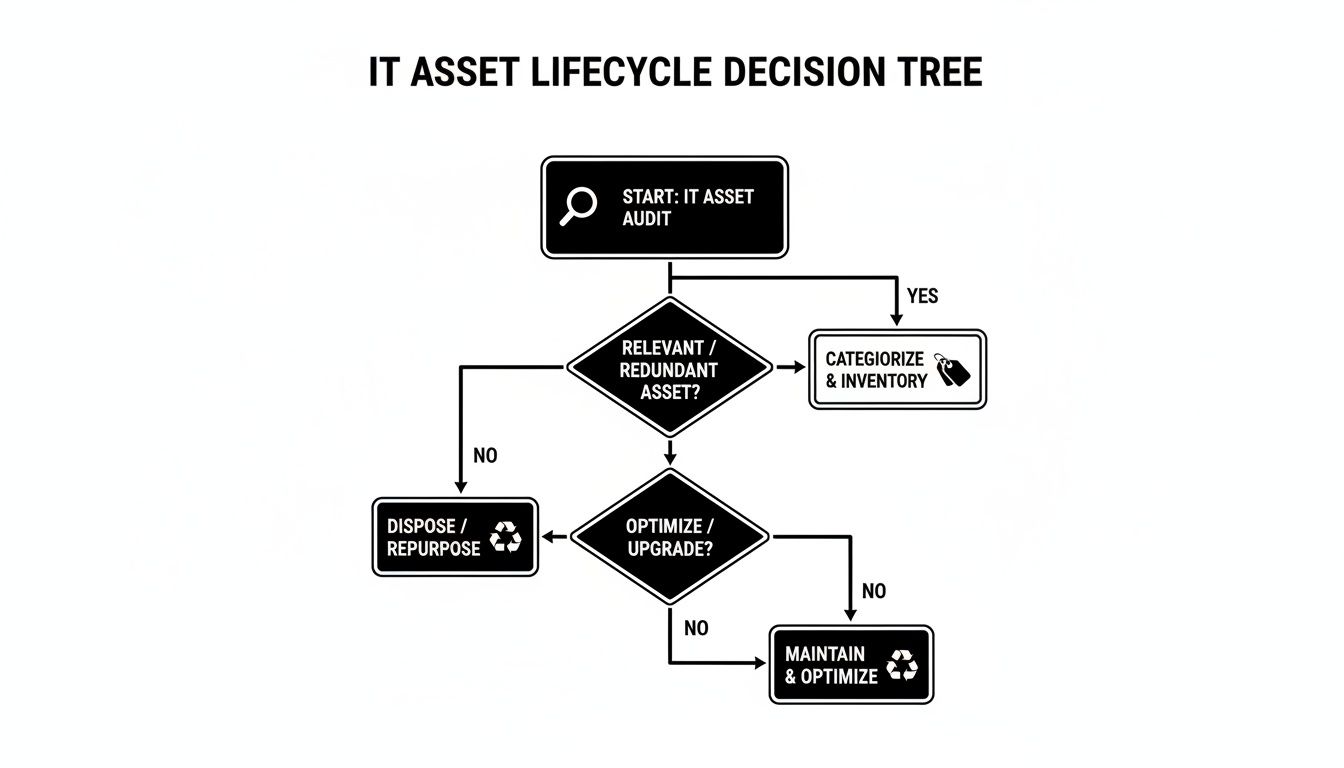
As you can see, secure disposal isn't just a single action—it's the final outcome of a structured process. It all starts with a thorough inventory to figure out the right path for each and every piece of equipment.
Choosing the Right Data Destruction Method
Your choice of data destruction comes down to two things: how sensitive the data is and what you plan to do with the hardware next. A laptop you’re hoping to refurbish and resell needs a completely different approach than a server that once held sensitive client files.
There are really three main ways to sanitize data, each offering a different level of security.
Choosing the Right Data Sanitization Method
Deciding how to destroy data can feel complicated, but it boils down to balancing security needs with the future value of the asset. This table breaks down the common methods to help you choose the right level of security for your e-waste.
| Method | Description | Security Level | Best For |
|---|---|---|---|
| Data Wiping | Specialised software overwrites all data with random characters, often in multiple passes. | Medium to High | Devices intended for reuse, resale, or internal redeployment. The hardware remains perfectly usable. Example: Wiping laptops from the sales team before giving them to new hires. |
| Degaussing | A powerful magnetic field is used to scramble the magnetic domains on hard drives and tapes, erasing everything. | High | Magnetic media (HDDs, tapes) where reuse is not required. The drive is rendered inoperable. Example: Decommissioning old backup tapes from a server room. |
| Physical Destruction | Industrial shredders or crushers physically demolish the storage media into tiny, irreparable fragments. | Maximum | End-of-life devices, SSDs, and any hardware that contained highly sensitive or regulated data. Example: Destroying server drives from a healthcare provider that held patient records. |
Ultimately, the goal is to make your information permanently irretrievable. For a deeper dive, it's worth reviewing a guide for compliant security data destruction to ensure your methods align with industry best practices and legal requirements.
Real-World Example: A Financial Firm’s High-Stakes Disposal
Imagine a financial services firm in Makati retiring a set of servers that processed client transactions. For this company, strict compliance with the Philippine Data Privacy Act of 2012 is everything. A data breach could lead to crippling fines, lawsuits, and a total collapse of client trust.
In this scenario, just wiping the server drives isn't going to cut it. The risk of data recovery, no matter how small, is far too great. The only truly acceptable path forward is certified physical destruction. The firm would need to partner with a certified ITAD vendor who can either shred the drives on-site under supervision or transport them securely to a controlled facility for destruction.
For any business handling sensitive personal or financial information, physical destruction isn't just a best practice; it's a legal and ethical necessity. The potential cost of a data breach will always far outweigh the cost of secure disposal.
The Undeniable Importance of Certification
Once the data is destroyed, your job isn't quite finished. You need proof. This is where a Certificate of Data Destruction becomes one of the most critical documents in your entire ITAD process.
This legally binding document is your official record that the data was destroyed in a compliant, verifiable manner. It should be issued for every single drive or storage device and must include specific details:
- Serial numbers of all destroyed assets
- The exact method of destruction used (e.g., shredding, degaussing)
- The date and location where the destruction took place
- A statement of indemnification from your vendor, which transfers liability away from you
Think of this certificate as your shield. In the event of an audit or legal dispute, it proves you took all the necessary steps to protect sensitive information, fulfilling your obligations under data privacy laws. Without it, you’re left with no verifiable evidence, which is a very exposed position to be in.
Protecting your business from future liabilities is a core part of any responsible strategy for the disposal of electronic waste. For businesses looking to strengthen their data protection protocols from top to bottom, a cyber security consultation can offer expert guidance on implementing these crucial security measures.
How to Find and Vet Certified E-Waste Partners
Choosing a partner for your disposal of electronic waste is probably the most crucial decision you'll make in this entire process. Let’s be clear: not all recyclers are created equal. Getting this wrong can completely undo all your careful work on inventory and data security.
A cheap, uncertified vendor might dangle a low price tag, but that initial "saving" could cost you dearly in fines, brand damage, and serious legal liability down the road.
When you hand your old tech to an unaccredited scrapper, you lose all control. Too often, that e-waste ends up illegally dumped or broken down in hazardous backyards. This isn't some distant problem; it's happening right here.
The Philippines is one of Southeast Asia's top e-waste generators, producing a mind-boggling 540 million kilograms in 2022. In many informal dismantling sites, people burn wires and components to get at the valuable metals inside, releasing a toxic plume of lead, mercury, and cadmium. Health officials have repeatedly warned this leads to devastating consequences like cancer and neurological disorders for workers and their families. You can learn more about the health impacts of Philippine e-waste dismantling from recent reports.
Picking a certified partner isn't just a box-ticking exercise. It's about ensuring your company doesn’t become part of this public health and environmental crisis.
Your Non-Negotiable Credentials Checklist
When you begin evaluating potential partners, there are a few credentials that are simply non-negotiable. These certifications are your frontline defence against risk, assuring you that a vendor operates legally, safely, and transparently.
Here's the essential documentation you need to see:
- DENR Accreditation: This is the absolute starting point in the Philippines. Any legitimate e-waste partner must be accredited by the Department of Environment and Natural Resources (DENR) as a Treatment, Storage, and Disposal (TSD) facility. Don't just take their word for it—ask for their TSD registration number and verify it.
- ISO Certifications: Look for key international standards that signal a real commitment to quality and environmental stewardship. ISO 14001 is the global benchmark for environmental management systems, while ISO 9001 covers quality management. These tell you the vendor is serious about following recognised best practices.
- A Transparent Chain of Custody: Your partner has to provide clear, detailed paperwork that tracks your assets from the second they leave your office to their final destruction or recycling. This isn't a "nice-to-have"; it’s your legal proof of proper disposal.
A truly professional partner will be proud to show you their certifications. If a vendor gets defensive, makes excuses, or can't produce these documents, consider it a massive red flag. Walk away. Your company's reputation is on the line.
Moving Beyond Paperwork
Certifications are critical, but your due diligence shouldn't end there. The best partners are an open book and are more than willing to show you exactly how they handle things. This is where you separate the real pros from the rest.
Go the extra mile to build confidence in your choice:
- Request a Facility Tour: Ask to see their operation, either in person or via a video call. A reputable recycler will have a clean, organised, and secure facility. You should see proper sorting areas, a locked cage or room for data-bearing devices, and clear safety protocols for their team.
- Verify Client References: Don't just glance at a list of logos on their website—actually call their clients. Ask about their real-world experience. Focus on professionalism, communication, and the quality of the final documentation. A killer question to ask is, "Did anything unexpected happen, and how did the vendor resolve it?"
- Scrutinise Their Data Security Process: Get them to explain their data destruction methods step-by-step. Do they offer on-site shredding? What software do they use for wiping drives? And crucially, ask for a sample of their Certificate of Data Destruction to ensure it meets your legal and compliance standards.
The Tale of Two Businesses: A Practical Example
Let’s look at a real-world scenario to see just how much this vetting process matters.
Company A (The Risky Route): A mid-sized logistics company needed to offload 50 old office PCs. To cut costs, they went with a local scrapper who gave them the lowest quote. The guy showed up, loaded the computers into a truck with zero paperwork, and promised to "handle it." Six months later, the DENR contacted the company. Several of their asset-tagged computers were found in an illegal dumpsite. They were hit with fines for improper disposal, and the resulting news story was a public relations nightmare.
Company B (The Smart Route): A BPO firm was retiring 100 workstations. They chose a DENR-accredited partner holding an ISO 14001 certification. The vendor provided a detailed quote covering secure transport and certified data destruction. On pickup day, their team logged every single asset against the inventory list. A few weeks later, the BPO received a complete documentation package, including the chain-of-custody report and individual Certificates of Data Destruction for every hard drive. They had iron-clad proof of compliance and total peace of mind.
The true difference wasn't the initial cost of the service—it was the devastating cost of risk. Company B made a smart investment in a secure and compliant process for their disposal of electronic waste, safeguarding their data, their reputation, and their bottom line.
Managing Logistics and Proving Chain of Custody
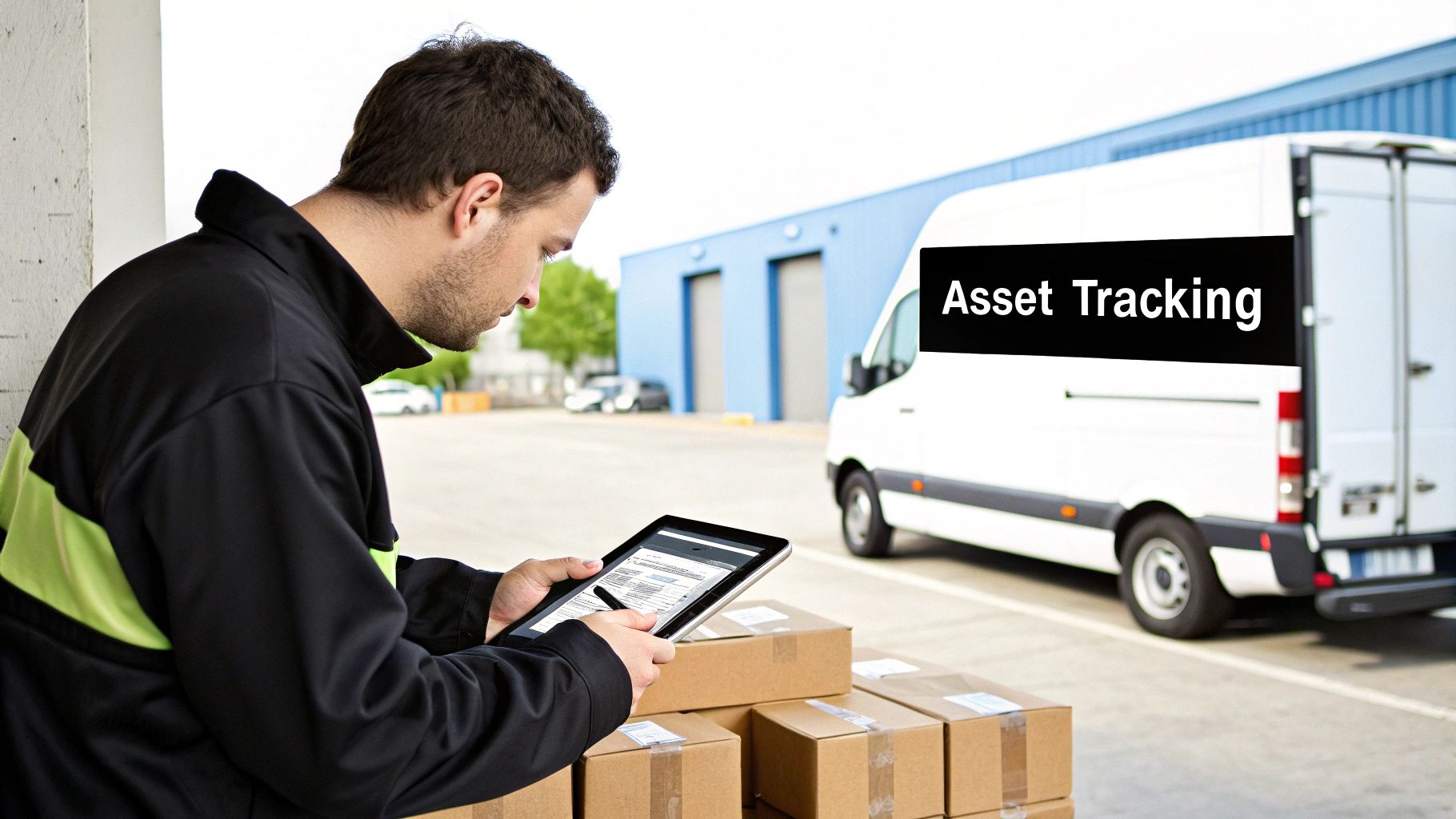
You’ve wiped the data. You’ve picked a certified vendor. Great work. But the job isn't done until your old equipment is securely off your premises and you have the paperwork to prove it. This final logistical step is arguably the most critical—it’s where your entire disposal of electronic waste process gets validated with an auditable trail that protects your company down the line.
Think of it this way: secure transport and solid documentation are two sides of the same coin. One prevents your assets from vanishing en route, while the other gives you the legal proof that every single device was handled correctly. Without both, your compliance efforts are just a promise, not a fact.
Coordinating a Secure Pickup and Transport
The moment your retired assets leave your building, they’re in a vulnerable state. A casual pickup with an unmarked van and no tracking is a massive, unnecessary risk. A professional ITAD partner understands this and treats the physical handover with the seriousness it demands.
When you’re arranging the collection, don't be afraid to set high standards. Here's what you should insist on:
- Scheduled and Verified Collection: The pickup needs to be locked in for a specific date and time. The vendor's team should arrive in clearly marked vehicles and professional uniforms. No surprises.
- On-Site Asset Verification: Before a single box is loaded, the vendor’s crew must verify the equipment against your inventory list. For instance, they should have a barcode scanner to scan the asset tag on each of the 50 laptops you are decommissioning, matching it against the list you provided.
- Secure Transport: This is non-negotiable. All assets, especially anything that once held data, must travel in locked, GPS-tracked vehicles. This provides a real-time log of the truck’s journey and is a powerful deterrent against theft.
For bigger jobs, like a complete data centre decommissioning, the stakes are even higher. The principles of secure infrastructure management, common in facilities like a colocation data center, are paramount here.
The Critical Role of Chain of Custody Documentation
Let's talk about the chain of custody. This is the single most important set of documents you’ll receive. It's the unbroken, chronological paper trail that tracks every touchpoint for your assets, from your door to their final destination. It’s the story that proves you did everything by the book.
Simply put, without a rock-solid chain of custody, you have no verifiable proof of compliance. When an auditor asks what happened to a specific server, this documentation is your only definitive answer.
This isn't just a basic receipt. A proper chain of custody report is detailed, specific, and links every single item back to the inventory you created at the very beginning.
Essential Elements of Your Chain of Custody Report:
| Document Component | Why It's Essential |
|---|---|
| Asset Serial Numbers | This is the unique fingerprint for each device. It confirms the specific laptop from your inventory was the one received and processed. |
| Pickup and Delivery Signatures | Timestamps and signatures from your staff and the vendor’s driver are non-negotiable. They are the legal proof of the handover. |
| Final Disposition Report | This is the final chapter. It details whether an asset was resold, recycled, or physically destroyed, officially closing the loop on its lifecycle. |
| Certificates of Destruction | As we covered earlier, a separate certificate must be issued for every single drive that was wiped or shredded. |
Scenario: A Multi-Site Company Disposal
Imagine a retail company with 10 branches across Luzon retiring old point-of-sale (POS) systems. The IT manager at their Makati headquarters can't physically be at every location for the pickup. This is a perfect example of where a meticulous logistics and documentation process proves its worth.
A certified ITAD partner would coordinate scheduled pickups from all 10 branches. At each store, the local manager signs a form verifying the serial numbers of the gear being collected. The assets are then securely transported to a central processing facility.
In the end, the IT manager in Makati receives a single, consolidated package of documents. It would contain 10 separate pickup manifests, a master list cross-referencing all serial numbers, and a final report detailing the certified data destruction and recycling for every last unit. This gives them the confidence to report to auditors and regulators that every device from every branch was properly managed.
Common Questions on E-Waste Disposal
When it comes to getting rid of old IT equipment, IT managers and business owners often have the same pressing questions. Let's tackle some of the most common queries we hear from companies all over the Philippines.
Getting these answers right can make a huge difference in your IT Asset Disposition (ITAD) strategy, helping you keep it secure, compliant, and cost-effective. It’s all about protecting your business from risks you might not even see coming.
What’s the Biggest Mistake Companies Make with Old IT Gear?
Hands down, the most dangerous mistake is focusing on the physical hardware and completely overlooking the data on it. Too many businesses think that a simple format or deleting files is enough to wipe a drive clean.
That’s a massive risk. Data recovery software is widely available and can easily pull sensitive information from drives that weren't professionally sanitized. Another common blunder is picking an uncertified recycler just to cut costs. This often leads straight to illegal dumping, which can hit you with heavy fines and do lasting damage to your company's reputation.
Always start with certified data destruction before any hardware leaves your sight. Treating data security as your first priority isn't just a good idea—it's your best defence against future liabilities.
Can We Sell Our Old Computers Instead of Just Recycling Them?
Absolutely. In fact, it’s often the best move for both your budget and the environment. If your equipment still works and has some market value, refurbishing it for resale can get you a decent return on your original investment.
But you have to handle it the right way. A structured approach is essential to get the most value back while keeping your data safe. A practical example: a design agency upgrades its 20 iMacs. Instead of recycling them, they partner with an ITAD vendor who securely wipes the drives, cleans the machines, and resells them to a school, returning thousands of pesos back to the agency.
A proper resale process should always include:
- A thorough hardware audit: An expert needs to check the condition of each machine to figure out what it's really worth on the secondary market.
- Certified data sanitization: Every single hard drive and storage device must go through a certified wiping process, with proof that your data is gone for good.
- Smart, minor upgrades: Sometimes, small tweaks like adding more RAM or swapping in an SSD can significantly boost the resale price for a minimal cost.
The key is to work with an ITAD partner who has a solid resale network. They'll handle everything—from the secure data wipe to finding the right buyers—so you get the best possible return without the headache.
How Should We Deal with E-Waste from Our Remote Staff?
This is a big one now, and it needs a formal plan. The best practice is to set up a clear, company-wide policy and a centralised retrieval program. You can't just leave it up to employees to figure it out themselves; that creates huge security and compliance holes.
When a remote employee's device is due for replacement or they leave the company, you need a documented process. Have a trusted, trackable courier service pick up the device securely. For example, you can send the employee a pre-paid, padded box with a return label. They pack the laptop, and the courier scans it upon collection, starting the chain of custody immediately.
From there, the equipment should either be returned to your main office for processing or sent straight to your certified ITAD partner. This way, every single company asset is accounted for and goes through the exact same secure data destruction and disposal process as your in-house gear. Never let employees handle the disposal of company property on their own—the risk is just too high.
At REDCHIP IT SOLUTIONS INC., we offer complete ITAD services, covering everything from secure data destruction and certified recycling to maximising your return on old assets. We help businesses across the Philippines manage their IT equipment's entire lifecycle with confidence. To build your own secure and compliant e-waste plan, visit us at https://redchipcomputers.com.



