Your business email is your digital handshake. Think about it: an address like mybusiness@gmail.com feels like a flimsy, generic business card—easily misplaced, quickly forgotten. On the other hand, contact@mybusiness.ph is sharp, professional, and instantly builds trust. For any business in the Philippines, this isn't just a nice-to-have; it's a foundational piece of your brand.
Why a Professional Email is Non-Negotiable for Business Credibility
In the fast-paced Philippine market, first impressions are everything. A generic email address can make your business look temporary or, even worse, not entirely legitimate. It screams "small-time" before you've even had a chance to say hello.
A professional email linked directly to your domain name changes the entire conversation. It shows you've invested in your brand and are serious about your business.
Let's say you're a potential client looking for a catering service for a corporate event in Makati. You get two proposals. One is from marias.kitchen.catering@yahoo.com, and the other is from inquiries@mariaskitchen.ph. Which one feels more established and trustworthy? It’s a no-brainer. That small detail can be the very thing that tips the scales in your favour.

Establish a Strong Brand Identity
A custom email isn't just a way for people to reach you; it's a branding powerhouse working for you 24/7. Every single email you send reinforces your company name and website. This repetition is key to building brand recognition, turning every message into a subtle marketing opportunity.
For instance, a law firm in Cebu named "Reyes & Associates" using reyes.associates@gmail.com misses a branding opportunity with every message. Switching to j.reyes@reyeslaw.ph not only looks more professional but also directs potential clients to their website, reyeslaw.ph. Getting your brand right from the start means paying attention to the details. Even something as simple as picking the right domain name extension plays a huge role in how your business is perceived online.
Build Trust with Clients and Partners
Trust is the currency of business. A professional email address adds a layer of authenticity that free email services simply can't offer. Clients, suppliers, and partners are far more likely to open and trust a message from a branded email because it’s tied to a legitimate domain and is much harder to impersonate.
Practical Example: An accounting firm sends an invoice from
accounting@abccompany.ph. The client immediately recognizes the sender, trusts the email is legitimate, and proceeds with payment. If that same invoice came fromabccompany.accounting123@yahoo.com, it would raise immediate red flags for a potential phishing scam.
Improve Internal Organisation and Scalability
As your team grows, keeping communications organised can become a real headache. Professional email hosting lets you create role-based addresses that bring order to the chaos. For example, a local hardware store can manage its operations far more efficiently with structured emails.
sales@yourcompany.phensures every potential lead from a new construction project gets to the right person.support@yourcompany.phcreates a dedicated channel for customer questions about a recent purchase.billing@yourcompany.phkeeps all supplier invoices and customer payment communications streamlined and easy to track.
This kind of structure doesn't just look professional; it makes your entire operation run smoother. In a market like the Philippines, where the e-commerce sector is expected to hit an incredible USD 86.2 billion by 2034, efficient and professional communication isn't optional. For help getting your IT infrastructure ready for that kind of growth, our guide to IT services and consulting is a great place to start.
Understanding Your Email Hosting Options
Once you've decided to move beyond a generic email address, the next big question is: what kind of email hosting is right for your business in the Philippines? This decision is a big one, affecting everything from your budget and daily workflow to your data security. Think of it like choosing a physical workspace—each option comes with its own mix of control, cost, and convenience.
Let’s break down the three main models you'll encounter: Cloud Hosting, Managed Hosting, and On-Premise Servers. Each one is built for a different kind of business, and knowing the difference is the key to making a smart investment.

Cloud Hosting: The Modern Coworking Space
Cloud-based email hosting, powered by giants like Google Workspace and Microsoft 35, is like getting a hot desk at a fully-loaded, modern coworking space. You get instant access to world-class tools, security, and infrastructure without ever worrying about setup or maintenance. All you do is pay a simple, predictable monthly fee for each user. It just works.
This model is a perfect match for agile startups, businesses with remote teams, and any company that values flexibility above all. A graphic design startup in Bonifacio Global City with a team of five can get set up with professional email addresses on Google Workspace in under an hour, with access to shared drives and video conferencing included. The provider handles all the technical headaches—server updates, security patches, bug fixes—so you can pour all your energy into growing your business.
It’s no surprise this approach is so popular. In the Philippines, the digital economy is absolutely booming, with an expected 53.4 million digital buyers by 2025. Businesses here need solutions that can scale fast and stay secure, especially with e-commerce revenues projected to hit USD 24 billion in that same year.
Managed Hosting: Your Private Serviced Office
Think of managed email hosting as the next step up: leasing your own private, serviced office. You get a dedicated space with more room for customisation, but the building management—your hosting provider—still takes care of all the security, maintenance, and utilities.
This is a fantastic middle-ground for small and medium-sized businesses (SMBs) in the Philippines. It's for those who need more control than a basic cloud plan offers but don't have a dedicated IT team to run a whole server in-house. A 20-person travel agency in Palawan, for instance, can use managed hosting to get larger mailboxes for storing client itineraries and benefit from local, hands-on support when an internet issue affects connectivity. Your provider's experts are always on call to handle technical glitches, ensuring your email is always up and running securely without you needing to hire full-time IT staff.
You get the perks of a specialised setup with the peace of mind that comes from having experts in your corner. It’s a powerful way to look professional without a massive upfront cost. And while setting up your email, it’s also a good time to look into the best email marketing software for small business to see how it can complement your new professional setup.
On-Premise Servers: Owning The Entire Building
Finally, there’s the on-premise server. This is like buying and owning your entire office building. You have total, uncompromising control over every single detail—the physical hardware, the software, security protocols, and who gets access to what. It offers the ultimate level of customisation.
But with great power comes great responsibility. You’re on the hook for everything: buying the server hardware, licensing the software, and hiring a skilled IT team to manage, maintain, and secure the system around the clock. This means a huge upfront investment and significant ongoing operational costs. You can get a sense of the required hardware by looking at powerful server options like Dell PowerEdge.
On-premise hosting is typically the domain of large corporations like a major Philippine bank or a hospital that must comply with strict data residency laws, requiring them to keep all sensitive patient or financial data physically within their own facilities. For most SMBs, the cost and complexity just don't make sense.
To make the choice clearer, here’s a quick comparison of how the three models stack up for businesses in the Philippines.
Comparing Email Hosting Models for Philippine Businesses
This table breaks down the key differences between Cloud, Managed, and On-Premise hosting to help you see which one aligns best with your company's resources and goals.
| Hosting Model | Best For | Initial Cost | Maintenance | Scalability |
|---|---|---|---|---|
| Cloud Hosting | Startups, remote teams, and businesses prioritising ease-of-use and predictable costs. | Low | None (handled by provider) | Excellent (add/remove users easily) |
| Managed Hosting | SMBs needing expert support, customisation, and enhanced security without an in-house IT team. | Moderate | Low (handled by provider) | Good (scales with your plan) |
| On-Premise Server | Large enterprises or organisations with strict data compliance needs and a dedicated IT department. | Very High | High (requires internal staff) | Limited (requires hardware upgrades) |
By weighing these factors against your business's size, budget, and technical know-how, you can confidently pick the email hosting solution that will not only support your growth but also solidify your professional image.
What to Look for in a Business Email Service
When you're choosing an email hosting provider, you're not just buying an email address. You're investing in a critical business tool. The right service needs to be reliable, secure, and genuinely efficient. For any serious business here in the Philippines, a few features are absolutely non-negotiable—they're the foundation of a solid email strategy.
Think of these core components as your digital insurance policy. They keep your communications online, shield you from threats, and make sure everything is accessible right when you need it. Skimping on these can lead to downtime, data breaches, and a nosedive in productivity that no growing business can afford.
Guaranteed Uptime with a Service Level Agreement
Picture this: you're a real estate broker in Taguig, and your email suddenly dies during the final negotiations for a major condo sale. Every minute you're offline, you risk losing the deal as the client grows impatient. This is exactly why a Service Level Agreement (SLA) is so important.
An SLA is your provider's formal promise to you, guaranteeing a specific level of service. The most critical part of that promise is uptime. It's usually a percentage, like 99.9% or 99.99%. That tiny difference between the nines matters a lot more than you think.
- 99.9% Uptime: This means your email could be down for up to 8.77 hours over a year.
- 99.99% Uptime: This cuts potential downtime to just 52.6 minutes for the entire year.
For a BPO in Manila that operates 24/7, every second counts. An SLA ensures their email system—the lifeline for every client conversation—is always on, backed by a real, contractual guarantee.
Advanced Security and Threat Protection
Cyber threats like phishing scams and malware aren't just a nuisance; they're a direct assault on your business's money and reputation. Even the most tech-savvy people can get tricked by a clever phishing email designed to steal login details. One click from a single employee can expose your entire network.
This is why advanced security isn't just a nice-to-have feature; it's a must. Professional email hosts invest heavily in multiple layers of security to keep your business protected.
Practical Example: An employee receives an email that looks like it's from BDO, asking them to "verify their account." An advanced email security system would detect suspicious links and sender details, automatically flagging or blocking the email before the employee even sees it, preventing a potential data breach.
As digital adoption skyrockets across the Philippines, local businesses have become prime targets. Our booming e-commerce market, projected to hit USD 86.2 billion by 2034, relies heavily on digital communication. Strong email security is what keeps that engine running. It's a global trend, and one we feel deeply across the islands. You can see how email advertising is fuelling market growth here to get a sense of the scale.
Intelligent Spam Filtering and Inbox Management
An inbox overflowing with spam isn't just annoying—it's a productivity black hole. Your team wastes precious time deleting junk instead of focusing on their actual jobs. Worse, spam is often the Trojan horse that delivers dangerous phishing links and malware.
Any modern email hosting in the Philippines has to include smart, adaptive spam filtering. These systems use machine learning to analyse incoming mail, catching and quarantining suspicious messages before they ever distract your team. This keeps workflows clean and adds another vital layer of security.
Just think of a busy logistics company in Manila coordinating dozens of deliveries a day. Their dispatch team can't afford to miss a real client request because it's buried under 50 spam emails. A clean, filtered inbox means faster replies, fewer errors, and smoother operations.
Automated Backups and Data Recovery
Losing your data can be catastrophic. Whether it's from an accidental deletion, a server crash, or a ransomware attack, losing years of important emails can stop your business in its tracks. And let's be honest, relying on someone to do manual backups is a recipe for disaster.
This is where automated daily backups become a lifesaver. A quality email host will automatically save a secure copy of your entire email database every single day, no manual effort required. For example, if an employee accidentally deletes a folder with a year's worth of client contracts, automated backups mean you can restore that data within minutes, not lose it forever. It’s the ultimate peace of mind. For a deeper look at protecting your business, take a look at our guide on comprehensive cyber security solutions.
How to Choose the Right Email Hosting Provider
Knowing what features you need is half the battle. Now comes the trickier part: picking the right partner to deliver them. The best email hosting Philippines providers aren't just selling a piece of technology; they’re offering a service built on reliability and a deep understanding of the local business landscape.
It's easy to get fixated on technical specs, but the real key to a smart decision is shifting your focus to service quality. After all, what good are features if you're left stranded when something goes wrong? A low price might catch your eye, but the hidden costs of poor service—downtime, lost clients, and security scares—are always far more expensive. This is where doing your homework really pays off.
Evaluate Local Technical Support Availability
Picture this: your email system crashes right in the middle of closing a huge deal on a public holiday. An international provider might leave you with a ticket number and an automated "we'll get back to you" message. A local provider, on the other hand, could have an actual expert on the phone, walking you through a fix within minutes. That’s the real-world value of support that’s both accessible and knowledgeable.
When you're talking to potential providers, don't be shy. Ask them directly:
- Is your support team actually in the Philippines? A local crew knows the ins and outs of regional internet challenges and works on your time zone.
- What does 24/7 support really mean? Make sure you're getting live agents on the phone or email, not just a link to a help forum or a conversation with a chatbot.
- What are your guaranteed response times? A serious provider will put their promises in writing, right in the service agreement.
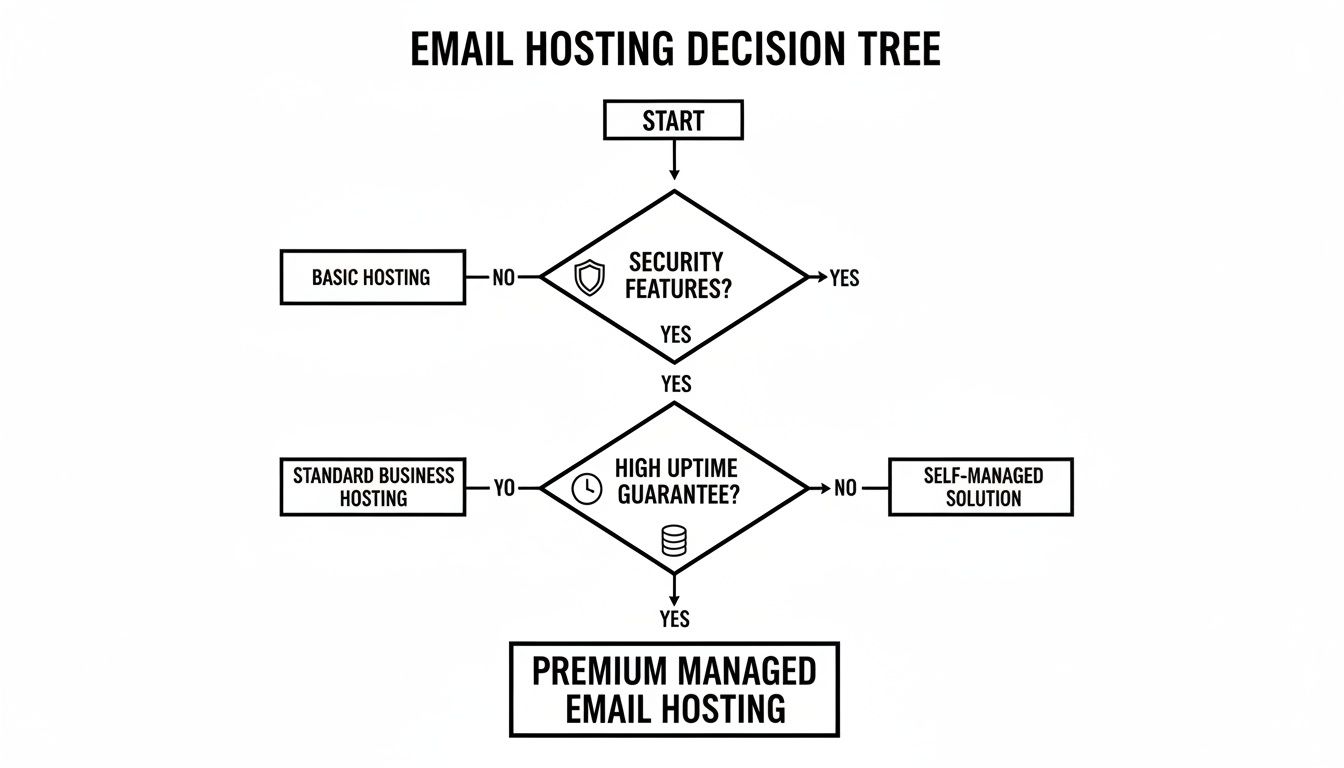
This decision tree shows it perfectly: before you even think about bells and whistles, you have to nail down the fundamentals like security and guaranteed uptime.
Scrutinise Data Privacy and Compliance
Here in the Philippines, the Data Privacy Act (R.A. 10173) isn't just a guideline—it's the law. Your email provider will be a custodian of your most sensitive company and customer information, so their compliance is non-negotiable. Partnering with a provider that cuts corners here puts your entire business at serious legal and financial risk.
Ask to see their data privacy policy and get specifics on how they comply with local regulations. A provider worth your trust will be completely open about their security protocols, how they handle your data, and even where their servers are physically located. That kind of transparency is a huge green flag.
Practical Example: A small clinic storing patient information in their email system must ensure their provider complies with the Data Privacy Act. A compliant provider will offer features like end-to-end encryption and have clear policies on data access, helping the clinic avoid massive fines and legal trouble.
Verify Their Track Record and Migration Support
Any provider's website will promise you the moon. The real proof is in their history with other businesses. Look for case studies and ask for references from companies in your industry and of a similar size. A solid track record is the best predictor of good service.
Just as crucial is how they'll handle the move. Migrating your entire email system can feel daunting, but a great partner will make the process smooth and painless. Ask them to walk you through their migration plan, step by step. They should be able to explain exactly how they'll transfer your data, keep downtime to an absolute minimum, and support your team once the switch is flipped. A provider who offers hands-on migration support is truly invested in your success.
A Practical Example: The Value of Local Expertise
Let's imagine a boutique hotel chain in Palawan trying to choose an email hosting provider. They've got it down to two choices.
Provider A is a massive international company with an incredibly low price. But their support is just a chatbot, and their privacy policy is a generic template that doesn't mention Philippine law.
Provider B is a Philippine-based IT firm. They cost a bit more, but they assign a dedicated account manager, offer 24/7 phone support from a local team, and have a data privacy framework designed specifically for R.A. 10173.
When a super typhoon hits, the hotel’s internet becomes unstable, and booking confirmations stop going out. They call Provider B. The support agent, already familiar with the region's ISP problems during bad weather, helps them reroute their email traffic. In less than an hour, everything is working again.
With Provider A, they would still be arguing with a chatbot, losing bookings and their hard-earned reputation with every passing minute. This simple story shows the immense value of a local partner who understands the unique challenges of doing business in the Philippines.
Making the Switch Without the Headaches
The very thought of moving your company's entire email system can be daunting. It brings up visions of lost messages, frustrated employees, and business grinding to a halt. This fear is a big reason many businesses in the Philippines stick with an outdated or unprofessional setup far longer than they should. But it doesn't have to be that way. With a clear plan and the right partner, migrating to a professional email host can be surprisingly smooth.
A successful migration isn't about just flipping a switch and hoping for the best. It's a structured, methodical process designed to protect your valuable data and cause as little disruption as possible. Think of it like a carefully planned office move. You don't just randomly throw everything into boxes; you catalogue, pack securely, and coordinate the entire move to ensure business continues without a hitch.

Step 1: Pre-Migration Audit and Backup
Before a single email is moved, the first critical step is a thorough audit. A good IT partner will sit down with you to map out every single email account you have, get a handle on your data volume, and spot any potential bumps in the road. This audit becomes the blueprint for the whole project.
For a local manufacturing company with 50 employees using a mix of personal Gmail and old company accounts, this audit is crucial. It identifies all data sources, ensures no accounts are forgotten, and helps estimate the total migration time. At the same time, a complete backup of all existing mailboxes is made. This is your safety net. It guarantees that every email, contact, and calendar appointment is securely preserved before the move begins.
Step 2: The Migration Process
This is where the heavy lifting happens, but for you and your team, it should feel like it's all happening behind the scenes. Using specialised tools, your provider will transfer the backed-up data from your old system over to the new email hosting Philippines platform. This is almost always scheduled during off-peak hours—overnight or on a weekend—to ensure your daily operations aren't affected.
The goal here is minimal disruption. Ideally, your team logs out of their old email on a Friday and logs into their new, more powerful system on Monday, finding everything exactly where they left it.
A well-managed migration should feel almost invisible to your end-users. The ultimate sign of success is when your team barely notices a change, aside from improved performance and reliability.
Step 3: DNS Configuration and Go-Live
The final technical piece of the puzzle involves updating your domain's DNS records. This is a crucial change that tells the internet where to send your new emails—pointing them to your new provider instead of the old one. A skilled provider handles this with precision, ensuring there's no gap where emails could get lost in transit.
Once the DNS changes are active, your new professional email system is officially live. Your provider will then run a series of tests to confirm that mail is flowing correctly and everything is working perfectly.
Step 4: Post-Migration Support and Onboarding
The job isn't done just because the switch has been flipped. A great partner provides dedicated support after the migration to handle any immediate questions or issues. This is what truly makes the transition a success.
This support typically includes:
- Helping users connect devices: Walking staff through setting up their new email on desktops, laptops, and mobile phones. For example, a sales team on the road can get immediate help setting up their new professional email on their smartphones.
- Answering questions: Providing a direct helpdesk contact for any "how-to" queries that pop up.
- Monitoring the system: Keeping a close eye on the new environment to ensure it remains stable and secure.
This final stage is what turns a technical project into a true business improvement, ensuring your team can start taking full advantage of their new communication tools right away.
Decoding the True Cost of Email Hosting
When you're shopping for email hosting in the Philippines, it’s easy to get fixated on the monthly price. You see a low number and think, "Great, that's a bargain." But honestly, that subscription fee is just the tip of the iceberg. To really get a handle on what you're spending, you need to think about the Total Cost of Ownership (TCO).
This isn't just business jargon; it's a way of looking at the bigger picture. It forces you to consider all the hidden costs that can pop up when you skimp on your email service. A cheap plan might save you a few hundred pesos now, but a single hour of email downtime during your busiest season could easily wipe out a year's worth of those savings.
Beyond the Monthly Fee
Most providers use a simple per-user, per-month pricing model. You’ll see basic plans starting around ₱150 per user for standard features. For more firepower—think bigger mailboxes, top-tier security, and email archiving—you’re looking at something in the ₱300 to ₱600 per user range.
But the real costs show up when things go sideways. Let's talk about what that actually looks like with a practical example.
- Lost Productivity from Spam: Imagine a 10-person accounting team where each member wastes just 15 minutes a day deleting junk mail and avoiding phishing attempts. That's 2.5 hours of paid professional time lost every single day. A quality email host with strong spam filtering gives that time back.
- Revenue Loss from Downtime: An online flower shop in Manila relies on email for Valentine's Day orders. If their cheap email service goes down for just two hours on February 13th, they could lose dozens of high-value orders, costing them tens of thousands of pesos in a single afternoon.
It's a common mistake to view professional email hosting as just another operational expense. In reality, it’s an investment in your company's efficiency, security, and professional image. It’s a move that pays for itself by preventing much bigger, more expensive problems down the line.
The High Price of a Security Breach
By far, the biggest hidden cost is the fallout from a security breach. A single phishing email that fools an employee can unleash a torrent of problems: direct financial loss, stolen customer data, and a reputation that's suddenly in tatters. Rebuilding that client trust can take years, if you can rebuild it at all.
Think about a local real estate firm whose email gets hacked. The attacker then impersonates them, sending fake invoices with altered bank details to clients about to make a down payment. The money is gone in an instant. But the long-term damage to the firm's credibility could be a business-ending event.
This is why investing in a provider with solid, advanced threat protection isn't an optional extra; it's fundamental. When you weigh the potential cost of downtime, lost productivity, and a security disaster against the price of a robust email plan, the smarter choice becomes obvious. A reliable email system doesn't just save you headaches—it actively protects your bottom line.
Frequently Asked Questions About Email Hosting
Diving into professional email for the first time? It's natural to have a few questions. Let's tackle some of the most common ones we hear from businesses in the Philippines to help you get clear on what matters.
How Is Professional Email Different from the Free Email with My Web Hosting?
Think of the free email that comes with your web hosting package as a courtesy add-on. It’s like the stock-standard lightbulb you get when you move into a new flat – it gets the job done, but you wouldn't rely on it to light up a whole workshop. These free accounts often have to share server space with hundreds of other users, which can mean slower speeds, tiny storage limits, and fairly basic security.
A professional email hosting service, on the other hand, is a purpose-built system designed for one thing: running your business communications flawlessly. You get dedicated resources, which translates to faster performance, beefed-up security that actively fights off spam and malware, and business-critical features like guaranteed uptime and regular backups. It’s built for reliability from the ground up.
Practical Example: If another website on your shared web hosting server gets blacklisted for sending spam, your "free" email address could be blacklisted too, preventing your legitimate business emails from reaching customers. A dedicated email hosting service isolates you from "bad neighbours."
Can I Use My Existing Domain Name?
Of course! In fact, you absolutely should. Any good email hosting provider will see this as a standard part of the setup. They'll walk you through the steps to connect your domain name (like yourbusiness.ph) to their email servers.
It's usually just a simple tweak to your domain's DNS records. Your provider will give you the exact details to plug in, making sure the switch is smooth. Before you know it, you'll be sending and receiving from a professional address like sales@yourbusiness.ph, keeping your brand identity consistent.
How Long Does Email Migration Take?
Honestly, it depends on how much data you're moving. For a small business with just a handful of accounts, we can often get the whole migration done and dusted—from the first backup to the final switch—within 24 to 48 hours.
If you're a larger company with hundreds of employees or massive archives of old emails, the process will naturally take a bit longer, maybe a few days. A smart provider will plan this carefully, scheduling the heavy lifting for off-peak hours (think weekends or overnight) to ensure there's zero to minimal disruption for your team.
What Security Is in Place Against Spam and Viruses?
This is where professional hosting really shines. These services use a multi-layered defence system to keep your business safe, which is a world away from the basic protection on free alternatives. Even the most tech-savvy person can get tricked by a clever phishing email, which is why strong system-level protection is so important.
Here’s what you should expect:
- Advanced Spam Filtering: This isn't just a simple filter. It uses smart technology to learn what junk mail looks like and quarantines it before it ever hits your inbox.
- Anti-Malware and Virus Scanning: Every single attachment, both coming in and going out, gets scanned for malicious code. For example, if a supplier sends an invoice that secretly contains malware, the system will block it before it can infect your computer.
- Anti-Phishing Protection: The system is trained to spot and flag suspicious emails that are trying to impersonate legitimate companies to steal your passwords or financial details.
All these tools work together behind the scenes, creating a secure bubble for your communications so you can focus on running your business, not fighting off online threats.
Ready to make the switch to a secure and reliable email system that just works? REDCHIP IT SOLUTIONS INC. offers managed email hosting built for the needs of Philippine businesses, making sure your communication is always online and always protected. Secure your business email today.



