For a lot of businesses here in the Philippines, IT maintenance feels like a never-ending cycle of putting out fires. You're constantly reacting to problems only after they’ve brought everything to a screeching halt. This is where we need to draw a clear line between preventive and corrective maintenance. Think of it this way: one is like a regular, scheduled health check-up to catch issues early, while the other is the emergency room visit after something has already gone wrong.
Why Proactive IT Maintenance Is a Competitive Edge

Let's use a real-world example. Say you run a logistics company with a fleet of delivery vans. Preventive maintenance is your routine oil change, tyre check, and brake inspection. It’s a predictable cost you plan for, and it keeps your vans on the road, earning money. Corrective maintenance is that frantic call to a mechanic because a van broke down on SLEX during a crucial delivery run. It’s chaotic, costly, and throws your entire schedule into disarray.
Your IT systems are no different. In today's digital-first economy, sticking to a purely reactive, "break-fix" model is a recipe for disaster. The cost isn't just the repair bill; it’s a ripple effect that touches every part of your business.
The True Cost of IT Downtime
When a server crashes or your network goes offline, the financial bleeding starts immediately and spreads fast. We're not just talking about lost sales during the outage. You have to account for the hidden, and often larger, costs:
- Plummeting Productivity: Suddenly, your team is stuck. For a BPO, this means agents can't take calls. For an e-commerce business, staff can't process orders. Every minute of downtime is a minute of paid-for labour going down the drain.
- Damaged Client Trust: When you miss deadlines or can't be reached because your systems are down, it erodes the confidence your customers have in you. A law firm that can't access case files before a court date, for example, faces a serious credibility problem. That damage can be permanent.
- Emergency Repair Premiums: Getting an expert to drop everything and fix your problem on a Friday night will always cost a premium. It’s a panic tax you pay for not planning ahead.
Shifting from a reactive to a proactive stance on IT isn't just about fixing things faster; it's about building a more resilient and reliable business. This strategic move transforms IT from a recurring expense into a powerful driver of growth and stability.
Gaining a Competitive Advantage
A smart preventive maintenance plan delivers more than just peace of mind—it gives you a serious leg up on the competition. One of the biggest wins is optimising your resources to cut down on operational costs. For example, simple but effective strategies like scheduling EC2 instances to stop and start automatically can dramatically reduce your monthly cloud computing bills.
By investing in proactive care, you ensure your systems are always up and running at their best. This level of reliability empowers your team to be more efficient, serve clients without interruption, and move faster than competitors who are always stuck dealing with technical emergencies. As you look for ways to sharpen your operational edge, understanding the wider trends in technology in the Philippines can help inform your strategy.
This is where a partner like REDCHIP IT SOLUTIONS INC. comes in. We help businesses translate this proactive vision into a concrete plan, making sure your technology is an asset that actively fuels your growth, not an anchor holding you back.
Getting to Grips with Preventive vs. Corrective Maintenance
When we talk about keeping your IT running smoothly, it really boils down to two core philosophies: preventive maintenance and corrective maintenance. To get a real sense of what this means for your business, we have to look past the textbook definitions and see how they actually function day-to-day. They're not just different tasks; they represent two completely different mindsets for managing the technology your business depends on.
Preventive maintenance is all about being proactive. Think of it as the scheduled, deliberate work you do to keep your systems in top shape and catch problems before they ever surface. It’s a strategy built on foresight and consistency, designed to keep everything running at peak performance and save you from those nasty, unexpected IT surprises.
On the other hand, corrective maintenance is purely reactive. It’s the classic "break-fix" model—you only call for help when a server dies, a critical app crashes, or a piece of hardware gives up. While you'll always need some level of corrective support (things just break sometimes), making it your main strategy is like driving without a seatbelt. It’s a huge risk.
The Proactive Game: What is Preventive IT Maintenance?
Think of preventive maintenance like the regular tune-ups and oil changes for your company's technology. It's all about tackling small, potential issues before they have a chance to grow into major disasters that bring your business to a screeching halt. This kind of consistent upkeep is absolutely vital for long-term stability and security.
So, what does this look like in the real world?
- Monthly Security Patching: Imagine a vulnerability is discovered in Windows Server. Your IT team methodically applies the security update to every server in your office. This closes the digital "window" that cybercriminals could have climbed through, preventing a ransomware attack.
- Quarterly Hardware Cleaning: You'd be amazed how much damage a bit of dust can do. Physically cleaning out server room equipment, especially the fans and vents, prevents overheating—one of the most common and easily avoidable causes of hardware failure.
- Weekly Backup Verification: It's one thing to run backups, but it's another to know they actually work. This involves picking a random file from last night's backup, restoring it to a test folder, and making sure it opens correctly. This simple check confirms that, if the worst happens, you can actually recover your precious data.
The real aim of a solid preventive maintenance plan isn't to eliminate every single IT problem forever. That's impossible. The goal is to drastically cut down on how often things break, how much it costs when they do, and how badly it hurts your business.
The Reactive Scramble: Understanding Corrective Maintenance
Corrective maintenance is what happens when the alarm bells are already ringing. It's the emergency response team rushing in after something has already failed and is actively impacting your staff and customers. In my experience, this is almost always the most stressful and expensive way to handle IT.
Here are a few all-too-common scenarios that demand corrective action:
- Sudden Server Failure: Your main server, the one holding all the company's shared files or your primary database, just goes dark. No warning. Suddenly, nobody can get any work done.
- CRM System Crash: It’s the middle of a busy Tuesday, and your customer relationship management (CRM) software freezes. Your sales team is dead in the water, unable to access client info or log their calls.
- Total Network Outage: A construction crew accidentally cuts a fibre optic cable outside your building. An entire floor of your office suddenly loses all internet and network access, cutting them off from every digital tool they need.
This reactive model is often just accepted as a cost of doing business, especially here in the Philippines. Our outsourcing sector is a massive part of the economy, contributing around $30 billion annually. And what’s the most outsourced service? IT, at 54%. This trend is largely driven by the high cost of maintaining an in-house team and the constant need for both proactive upkeep and emergency tech support. You can explore more insights on the Philippine outsourcing landscape to get a better feel for these market dynamics.
Comparing the Two Maintenance Philosophies
The table below really highlights the stark differences between these two approaches. When you see them side-by-side, it becomes crystal clear why being proactive is the smarter long-term play for any business that cares about stability and growth.
Comparing Preventive vs Corrective Maintenance Approaches
| Attribute | Preventive Maintenance | Corrective Maintenance |
|---|---|---|
| Timing | Proactive & Scheduled | Reactive & Unplanned |
| Cost | Predictable, fixed monthly cost | Unpredictable, high emergency fees |
| Business Impact | Minimal disruption, often done off-hours | High disruption, causes significant downtime |
| Primary Goal | Maximise uptime and extend asset life | Restore functionality after a failure |
Ultimately, one approach is about control, and the other is about chaos. Preventive maintenance puts you in the driver's seat, allowing you to plan, budget, and minimise disruptions. Corrective maintenance forces you to react to crises, often leading to bigger bills and more significant damage to your productivity and reputation.
How to Build a Practical IT Maintenance Plan
Let's move from theory to action. A solid IT maintenance strategy isn't about fancy software or thick binders of rules; it's about systematically understanding what you have, knowing what matters most, and creating a plan to protect it. It all boils down to one foundational step: knowing your assets.
You can't protect what you don't know you have. The first move is always to build a complete asset inventory. This means getting a list of every single piece of IT gear and software your business depends on—servers, network switches, firewalls, employee laptops, and even crucial software licences and their renewal dates. Honestly, a simple spreadsheet is a great place to start.
It's also helpful to see this process as part of a bigger picture. When you understand the entire journey of your equipment, from purchase to disposal, your maintenance strategy becomes much more robust. Looking into the principles of IT Asset Lifecycle Management (ALM) can really put things into perspective.
Prioritising Your Most Critical Systems
Once you have your inventory, it's time for a risk assessment. Let's be real—not all IT assets are created equal. You need to pinpoint which systems would bring your operations to a grinding halt if they failed. This is where your business context is everything.
Think about it in real-world terms:
- For a BPO, the VoIP phone system and customer database are the heart of the business. If they go down, you're losing money and upsetting clients by the minute.
- For a logistics company, the warehouse management system (WMS) and the fleet's GPS tracking platform are non-negotiable. If they fail, packages stop moving.
- For a multi-site retail business, the Point-of-Sale (POS) systems and the central inventory server are everything. Failure here means you can't make sales or track what you have in stock.
By prioritising like this, you can focus your preventive maintenance where it will do the most good. Your most vital systems get the attention they deserve.
A maintenance plan without clear priorities is just a to-do list. A plan that focuses on high-risk, high-impact assets is a business continuity strategy.
The importance of this digital backbone can't be overstated. The Philippines' digital economy hit an estimated $36.5 billion in 2022, and the digital-enabling infrastructure behind it was worth about $28 billion. This staggering investment shows just how critical these systems are and why a structured maintenance plan isn't a luxury—it's a necessity.
This process flow shows how we move from proactive checks to reactive fixes to keep your systems running smoothly.
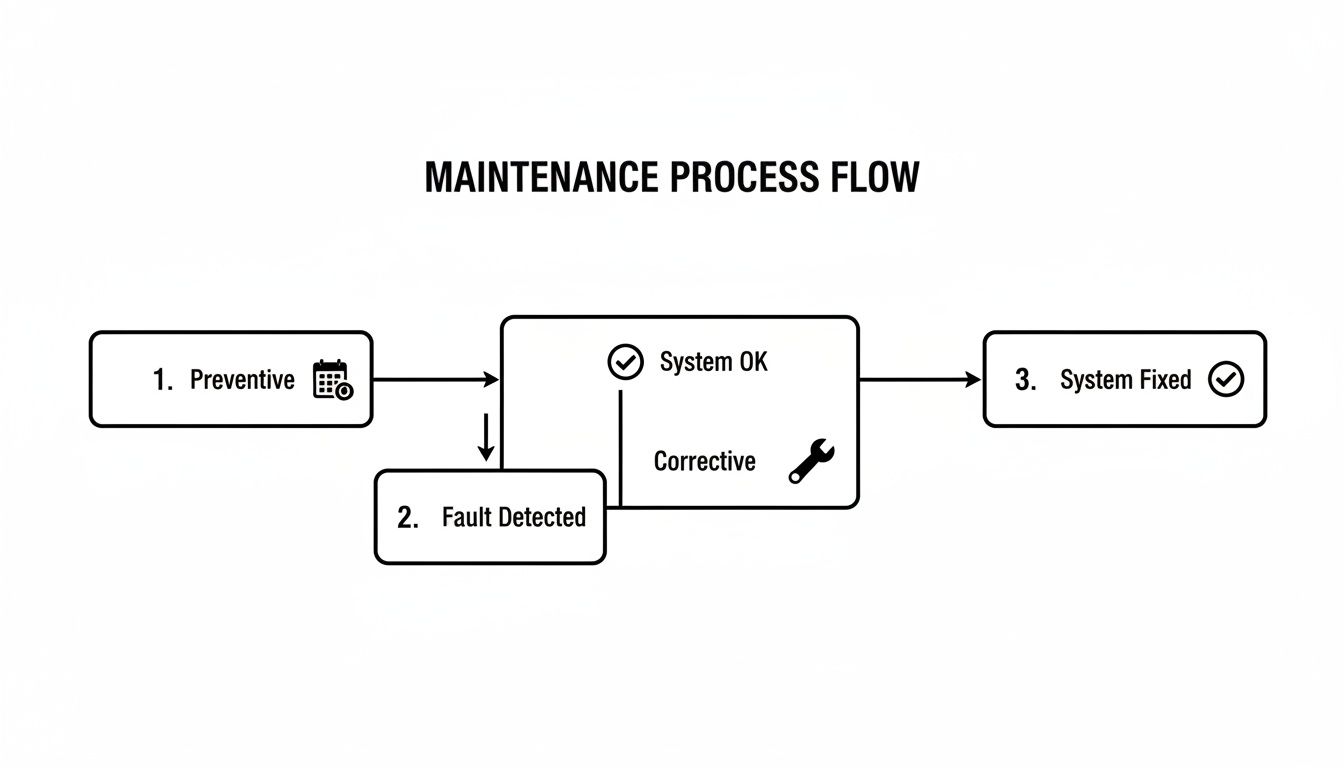
As you can see, consistent preventive work keeps things healthy, while corrective maintenance is the essential response when something does go wrong.
Creating Actionable Checklists and Schedules
With your priorities straight, you can now build actionable maintenance schedules. This is what turns good intentions into repeatable, reliable actions. The best way to make it manageable is to break it down by frequency.
Daily Automated Checks:
- Confirm that critical data backups completed successfully without errors. A practical example is an automated email report that says "Backup Job: SUCCESS."
- Monitor server CPU, RAM, and disk space for any unusual spikes or trends. An alert might trigger if a server's hard drive hits 90% capacity.
- Scan firewall logs for suspicious activity or blocked intrusion attempts.
Weekly Tasks:
- Review antivirus and anti-malware scan reports and clean up any detected threats.
- Check for and apply high-priority security patches for operating systems and core applications.
Monthly and Quarterly Tasks:
- Perform a full test restore from your backups to make sure the data is actually recoverable.
- Physically inspect and clean server room hardware—dust is the enemy of cool electronics.
- Review all user access lists and remove permissions for former employees or changed roles.
This kind of tangible framework gives you a clear blueprint. You can use it to guide your own team or hand it over to an IT partner like REDCHIP to execute on your behalf, ensuring nothing ever slips through the cracks.
Putting Your Maintenance Plan into Action
A great plan is one thing, but making it happen is another. This is where the rubber meets the road—connecting your strategy to the day-to-day tools and workflows that keep things running, whether it's routine preventive work or a sudden corrective crisis. The real trick is building a system that can spot trouble from a mile away but also react instantly when it hits.

It all starts with solid monitoring tools. Think of them as your IT infrastructure's early warning system. They keep a constant watch on your systems, 24/7, and automatically flag potential issues long before they turn into a full-blown outage that brings your business to a halt.
For example, a good monitoring tool will send an email alert to your IT team when a server’s hard drive is 85% full. This gives your team a chance to clear out old files or add more storage before the server crashes because it ran out of space. Or, it might spot a weird spike in network traffic, which could be anything from a security breach to a failing router, letting you jump on it proactively.
Anatomy of a Corrective Maintenance Ticket
Let's be realistic: even with the best preventive care, things will eventually break. When they do, a clear, efficient workflow is your best defence against costly downtime. Let’s walk through a common scenario to see how this process actually works in the real world.
Scenario: An entire department suddenly loses access to a critical shared network drive. Work stops. Deadlines are at risk.
Here’s how a proper corrective maintenance ticket flows from chaos to resolution:
- The Call for Help: An employee from the accounting department calls the helpdesk: "Nobody in accounting can open the 'Shared' drive!" A ticket is instantly logged, capturing who is affected, the name of the drive, and the error message "Network path not found."
- Getting it to the Right Person: The ticket is automatically routed to the "Network Infrastructure" team based on the issue type. No time is wasted asking around to see who handles network drives.
- The Clock Starts Ticking: The second that ticket is created, the Service Level Agreement (SLA) timer begins. For a high-priority issue like this, the SLA might demand a response in 15 minutes and a fix within one hour.
- Finding and Fixing: The assigned network engineer discovers the network switch that connects the accounting department has failed. They replace the faulty switch with a spare one.
- Closing the Loop: The technician doesn't just assume it's fixed. They call the original user back and ask them to try opening a file on the shared drive. Once they get the thumbs-up, the ticket is officially closed.
This structured workflow turns a potential disaster into a manageable, step-by-step process.
A defined ticketing process isn't just about being organised. It's about accountability and speed. It guarantees that every single problem is tracked, assigned, and resolved within a timeframe you’ve already agreed on, keeping business disruption to a minimum.
This is exactly where REDCHIP's dedicated helpdesk fits into your operations. Our team handles this entire lifecycle, providing the fast, expert response needed to tackle corrective maintenance without missing a beat. For anyone curious about what it takes to be on the front lines, looking into information technology help desk jobs shows the skills needed for these crucial roles. By outsourcing this function to us, you can rest easy knowing every IT issue is being handled with professional urgency, freeing up your team to focus on what they do best.
Measuring the Success of Your IT Maintenance
So, how do you actually know if all this effort in preventive and corrective maintenance is making a difference? You have to track what matters. Without clear metrics, you're flying blind. But with the right data, you can see precisely how your strategy is fortifying your business operations.
It all boils down to setting the right Key Performance Indicators (KPIs). These aren't just numbers on a spreadsheet; they're the vital signs of your IT infrastructure. They tell you what's healthy and what needs immediate attention.
Defining Your Most Important Metrics
To get a real sense of how your maintenance plan is performing, you need to focus on a few crucial KPIs. These specific metrics cut through the noise and give you clear, actionable insights into your system's health and your team's effectiveness.
For my money, two of the most powerful KPIs are:
System Uptime Percentage: This is the ultimate measure of reliability. It’s the percentage of time your critical systems are up and running. If your online store's server was available for 43,156 minutes out of a possible 43,200 minutes in a month, its uptime would be 99.9%. Hitting this target shows your preventive plan is working.
Mean Time To Repair (MTTR): This tracks the average time it takes to resolve an issue, from the moment it's flagged until it's completely fixed. If you had three outages that took 30, 60, and 90 minutes to fix, your MTTR would be 60 minutes. A low MTTR is a clear sign that your corrective maintenance process is sharp and efficient.
Think of a well-defined Service Level Agreement (SLA) as your performance guarantee. It's a formal agreement that turns vague promises into solid, measurable commitments, ensuring you get the exact level of service your business depends on.
Understanding Service Level Agreements
An SLA is essentially the rulebook for your relationship with an IT partner. It lays out crystal-clear expectations for service, spelling out everything from response times to resolution targets.
For instance, a solid SLA might guarantee a 15-minute response time for a critical issue like a server outage. This means that within 15 minutes of you reporting the problem, a technician must acknowledge the issue and start working on it. This ensures your biggest headaches get looked at immediately. Knowing your SLA inside and out is crucial for holding your provider accountable.
The Real Cost Equation
Finally, let's talk about the bottom line. The financial case for proactive maintenance becomes incredibly clear when you put the costs side-by-side. A managed preventive maintenance plan from a partner like REDCHIP comes with a predictable, fixed monthly cost. This makes budgeting a breeze and eliminates nasty financial surprises.
On the other hand, a reactive, "fix-it-when-it-breaks" approach leads to completely unpredictable expenses. Emergency call-out fees are always higher, and that doesn't even begin to factor in the hidden costs of lost business, a damaged reputation, and team productivity grinding to a halt during an outage.
This is especially true in the Philippines' fast-paced economy. Consider this: the Philippine IT-BPM industry is projected to generate $38 billion in revenue in 2024, reflecting a 7% annual increase. This explosive growth underscores just how critical reliable IT has become. Proactive maintenance isn't just a cost; it's an investment in protecting your revenue. You can find out more about the Philippine IT-BPM sector's impressive growth.
Common Questions on IT Maintenance
Even with a solid plan, a few questions always pop up when you're putting an IT maintenance strategy into practice. Here are some of the most common ones I hear from business operators here in the Philippines, along with some straight-to-the-point answers.
My Business Is Small—Do I Really Need a Formal Maintenance Plan?
Yes, absolutely. In my experience, small businesses are often the ones who need it most. Think about it: a small accounting firm with five employees relies on its tax software just as much as a large corporation. If that software's server fails during tax season, it could cripple their ability to meet deadlines, hitting them much harder than a large company with redundant systems.
A formal plan, even a simple one, means your critical systems aren't just left to chance. It's about reducing the risk of that sudden, costly downtime that can cripple a small company's cash flow and reputation. A managed service can make this kind of professional IT support surprisingly affordable, even for a small team.
How Often Should We Perform Preventive Maintenance?
This is a great question, but there's no single magic number. It really depends on the specific piece of equipment and its role in your business.
A good starting point looks something like this:
- Critical Network Servers: These are the heart of your operation. They should have automated health checks running daily and a hands-on manual inspection at least monthly.
- Employee Laptops: For most team members, a quarterly check-up for software updates, performance tuning, and a physical clean-up is plenty.
- Firewall & Security Devices: Threats are always changing. A thorough review of your security rules and logs should be done quarterly to stay ahead.
The key is to build a custom schedule that fits your specific setup and how you operate. A good IT partner can help you map this out so you're not over- or under-servicing your gear.
What Is the First Step to Outsourcing Our IT Maintenance?
It all starts with a simple conversation. The very first step is to get a thorough IT assessment done.
This isn't just a technical scan. A provider will come in, take a look at your entire infrastructure, and more importantly, listen. They need to understand your business challenges—for example, "Our sales team complains the CRM is slow every afternoon"—and where you want to go. From there, they can propose a support plan that covers both preventive and corrective maintenance, making sure the technology serves your business goals without breaking the budget.
Ready to build a resilient IT strategy that protects your business and fuels its growth? REDCHIP IT SOLUTIONS INC. creates customised maintenance plans that minimise downtime and maximise performance. Get in touch with us today to schedule your IT assessment.
Article created using Outrank


