Think of an RDS Relational Database Service as a managed cloud service designed to take the heavy lifting of database management off your shoulders. It handles all the tedious, time-consuming tasks like setting up hardware, patching software, and running backups, so you can pour your energy back into your applications and business growth.
Unpacking the RDS Relational Database Service
Let's use an analogy. Imagine your business data is a highly specialised library. If you decide to manage it yourself, you're not just the librarian; you're also the architect who builds the shelves, the security guard watching the doors, and the maintenance crew fixing leaks. This old-school approach means a huge upfront investment in hardware and the expert staff to run it all.
Now, an RDS Relational Database Service is like hiring a world-class professional firm to build and manage that library for you. You don't have to worry about the construction, security systems, or disaster recovery plans. You simply tell them what kind of information you need to store, and they handle everything else—from the infrastructure to the backups, and even creating instant copies in other locations for extra safety.
From Manual Labour to Automated Management
For businesses here in the Philippines, this shift from manual to managed database administration is a game-changer. Take a local e-commerce company that started out running its inventory and customer database on a single server in its office.
At first, this setup worked just fine. But as orders surged during peak shopping seasons like Christmas, the server would grind to a halt, leading to checkout errors and frustrated customers. The owner was constantly stressed about applying security patches, dealing with potential hardware failures, and remembering to create manual backups every single night.
Switching to an RDS Relational Database Service lifted all these burdens.
- Before RDS: The team sank hours every week into database maintenance—time that could have been spent on marketing or improving customer service. Preparing for a big 11.11 sale meant buying and setting up new hardware weeks in advance, a costly gamble.
- After RDS: The database now scales up automatically to handle massive traffic spikes and then scales back down when things quieten. Backups are completely automated, and security is handled by dedicated cloud experts. The team is now free to focus 100% on growing the business, knowing their data foundation is solid and secure.
This transition gets to the heart of what RDS offers: it eliminates the operational headaches of database management. It frees up your team to innovate and serve customers instead of getting bogged down in complex IT chores. Essentially, it puts enterprise-grade database technology within reach for businesses of any size.
Why RDS Is a Game-Changer for Local Businesses
For many Philippine Small and Medium-sized Businesses (SMBs) and Business Process Outsourcing (BPO) companies, managing an on-premise database can feel like a constant, expensive headache. It means big upfront costs for servers, a non-stop drain on resources for maintenance, and the ever-present fear of downtime bringing operations to a grinding halt. An RDS relational database service completely flips that script, letting you focus on growing your business instead of just keeping the lights on.
Think about it: instead of unpredictable, lump-sum investments in hardware, RDS moves you to a predictable, operational cost model. This opens the door for startups and growing businesses to access the same robust database technology that was once only affordable for massive corporations. You simply pay for what you use, allowing your tech expenses to scale naturally with your revenue.
From Cost Centre to Growth Enabler
Let's imagine a BPO in Cebu handling sensitive customer data for clients abroad. Their service level agreements (SLAs) are iron-clad, demanding almost perfect uptime. Even a few minutes of an outage could mean steep financial penalties and, worse, a shattered reputation.
With a traditional server closet setup, hitting that level of reliability is a huge undertaking. It would mean buying redundant hardware, hiring specialised database administrators (DBAs), and piecing together a complex disaster recovery plan—a massive financial burden for any growing company.
This is where an RDS relational database service changes everything. Its core features deliver immediate, tangible business benefits:
- High Availability: RDS can automatically create and maintain a standby replica of your database in a completely different physical location. If the primary one has an issue, it flips over to the backup copy almost instantly, preventing that dreaded downtime.
- Automated Backups: The service takes care of daily backups and keeps detailed transaction logs, all without you lifting a finger. If data gets corrupted or someone accidentally deletes something critical, the BPO can restore their systems quickly and get back to work.
These aren't just neat tech tricks; they are powerful tools for building a resilient business and earning client trust.
Fortifying Security and Simplifying Compliance
In today's world, especially for BPOs, protecting customer data isn't just a good idea—it's non-negotiable. RDS builds security right into its foundation, offering protections that are often complex and costly to manage on your own.
Practical Example: A local fintech startup needs to comply with BSP regulations, which require strict data protection. By using an RDS relational database service, they can enable encryption for their data both when it's stored (at rest) and when it's moving across the network (in transit) with a few clicks. This multi-layered approach helps protect sensitive financial information and makes it much easier to pass security audits without needing a full-time security guru on staff.
This move to managed databases isn't just for the big players. The data shows that small and mid-sized organisations are leading the charge. Globally, roughly 72% of its users are small or medium-sized businesses, and 46% of them generate under USD 50 million in annual revenue. This confirms RDS has become a mainstream tool for SMBs. You can find more details about these technology adoption trends to see how they align with the Philippine market.
Many of the benefits that make RDS such a powerful service for local businesses are rooted in the core advantages of cloud computing. To see the bigger picture, you can explore the 6 Reasons Why Cloud Hosting is a Game Changer. Ultimately, adopting an RDS relational database service allows you to offload the heavy lifting of database management and focus on what you do best—serving your customers and growing your business. Learn more about the role of technology in the Philippines in our related article.
Comparing RDS with Traditional Database Management
To really get a handle on what makes an RDS relational database service so valuable, it helps to see it next to the old-school way of doing things: managing a database on your own server. For a lot of businesses, the traditional path is filled with hidden costs and headaches that quietly eat up resources and add unnecessary risk.
It all comes down to one simple word: responsibility. When you manage your own database, whether it's on a physical server in the office or a virtual machine in the cloud, your team is on the hook for everything. We're talking about buying the hardware, installing the operating system, patching the software, setting up the database, and running backups. It's a full-time job that demands very specific expertise.
The Hidden Costs of Going It Alone
Think about just getting started. The traditional route often begins with a hefty capital expense (CapEx) for the server itself. Then, the operational expenses (OpEx) start piling up—power, cooling, and the salary for a Database Administrator (DBA) to look after it all. And that's before you even think about the potential cost of downtime if something breaks.
An RDS relational database service, on the other hand, flips this unpredictable model into a simple, predictable monthly expense. You only pay for what you use, which gets rid of the need for big upfront investments and the endless costs of maintaining hardware.
This diagram breaks down the core advantages of letting a managed service like RDS take over the heavy lifting.
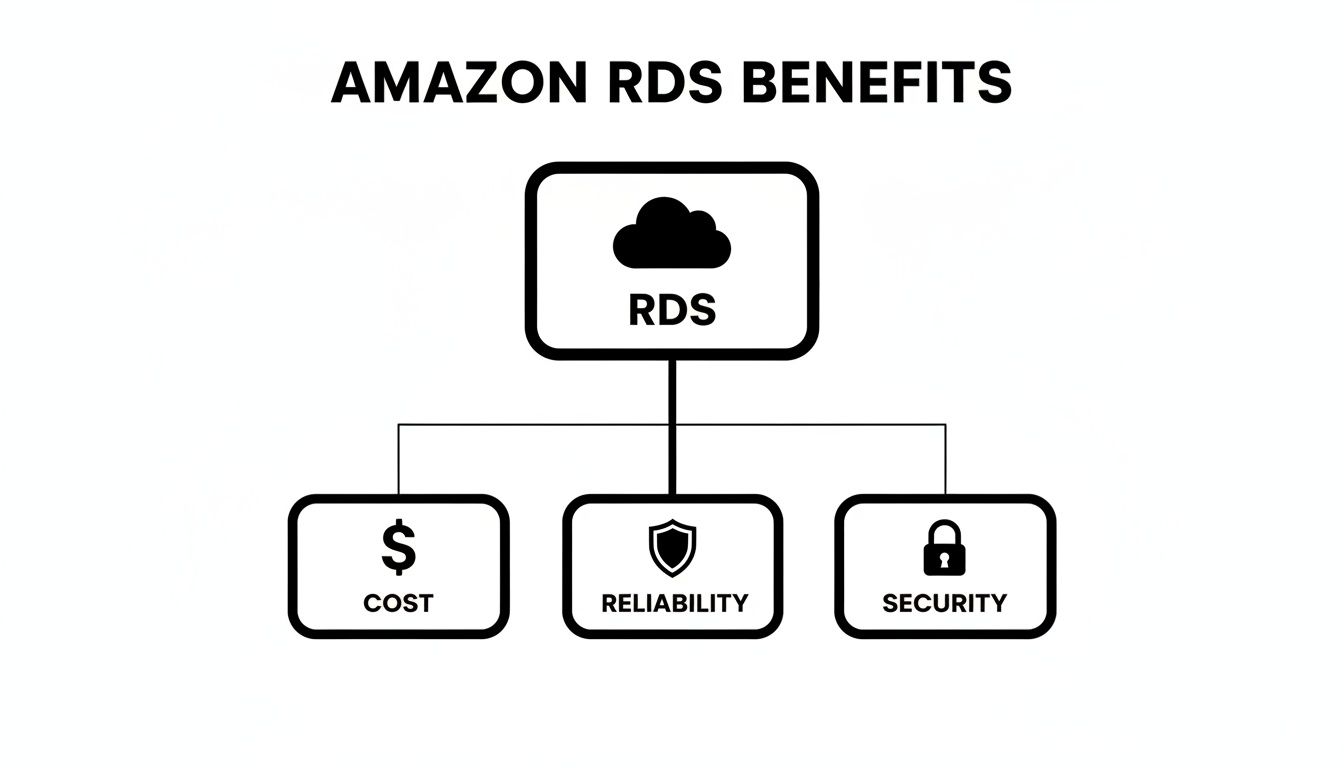
As you can see, RDS builds a strong foundation by taking care of cost, reliability, and security, which frees up your team to focus on what they do best.
To make the distinction crystal clear, here’s a direct comparison of who does what.
RDS vs Self-Managed Databases A Head-to-Head Comparison
This table breaks down the key responsibilities and outcomes when using a managed RDS relational database service versus managing a database on your own infrastructure.
| Responsibility | Self-Managed Database (On-Premise/VM) | Amazon RDS Managed Service |
|---|---|---|
| Hardware Provisioning | Your team purchases, installs, and maintains all physical server hardware. | Handled by AWS. No hardware to buy or manage. |
| OS & Software Patching | Your team is responsible for scheduling and applying all OS and database patches. | Automated by AWS during your chosen maintenance windows. |
| Database Setup | Manual installation and configuration of the database engine and parameters. | Automated setup with optimised, pre-configured templates. |
| Backups & Recovery | Your team must design, implement, and test a backup and recovery strategy. | Automated daily snapshots and point-in-time recovery are built-in. |
| High Availability | Requires complex setup of standby servers, replication, and failover logic. | One-click "Multi-AZ" deployment for automatic failover. |
| Scaling (Up/Down) | Involves significant downtime, hardware upgrades, and manual reconfiguration. | Scale compute and storage in minutes via the console, often with zero downtime. |
| Security | You are responsible for network security, data encryption, and access controls. | Managed by AWS with built-in encryption, network isolation, and IAM controls. |
| Monitoring & Alarms | Requires setting up third-party tools to monitor performance and health. | Integrated monitoring with Amazon CloudWatch for performance and alerts. |
This table shows a clear pattern: the self-managed route puts the burden of infrastructure management squarely on your shoulders, while RDS takes on that responsibility, allowing you to focus on your application and data.
Scaling and Maintenance: A Tale of Two Approaches
Let's use a real-world example. Imagine your e-commerce website is about to get a huge traffic spike from a holiday sale.
The Self-Managed Way: You'd have to buy and install more powerful hardware weeks, maybe even months, ahead of time. This usually means scheduling downtime and a lot of manual work to get everything reconfigured. After the sale, you're stuck with expensive, oversized hardware that's barely being used.
The RDS Way: With just a few clicks in the management console, you can scale up your database's processing power and storage. It takes a few minutes, often with no downtime at all. When traffic goes back to normal, you can scale it right back down just as easily to save money.
This huge difference in agility is just part of the story. The same contrast applies to routine maintenance. With on-premise servers, your team has to manually schedule and apply security patches and software updates—a task that is as tedious as it is critical. RDS, however, handles all of that for you automatically in the background during maintenance windows you get to define.
This shift does more than just save time; it ensures your systems are always protected from the latest threats without you having to lift a finger. Understanding the long-term effort of hardware care is key; you can learn more by exploring our guide on preventive and corrective maintenance to see how these principles apply on a larger scale. This fundamental difference in agility and security is what makes an RDS relational database service such a smart choice for any growing business.
Diving Into Core RDS Features and Engines
Think of an RDS relational database service not just as a data locker, but as a complete toolkit that keeps your database running reliably, securely, and at the right scale. These features are the secret sauce, handling all the complex, behind-the-scenes work that would normally demand a lot of manual effort and a specialised team.
At the heart of it all is a massive dose of peace of mind, thanks to features like Automated Backups. Instead of setting calendar reminders for nightly backups, RDS just does it for you. It creates daily snapshots and saves transaction logs, which enables a feature called Point-in-Time Recovery—an absolute lifesaver when things go wrong.
Practical Example: An employee at a local online publication accidentally deletes a critical table of articles. A nightmare scenario. With Point-in-Time Recovery, the team can restore the database to the exact state it was in at 10:31 AM, right before the mistake was made, practically erasing the error with almost no data loss or downtime.
Keeping Your Business Online and Performing Well
Beyond just backing things up, an RDS relational database service has some powerful tools to make sure your applications stay fast and responsive, even when traffic spikes or an unexpected outage occurs. Two of the most important features here are Multi-AZ deployments and Read Replicas.
A Multi-AZ (Multi-Availability Zone) deployment is your ultimate safety net. It's like having a live, identical twin of your database running in a completely separate, physical data centre. If your main database goes down because of a network glitch or a hardware failure, RDS automatically switches everything over to the standby copy. Your application stays online, and most of the time, your customers won't even have a clue anything happened.
Then you have Read Replicas, which are all about boosting performance.
Practical Example: A logistics company in Manila juggles thousands of daily delivery updates. If they run heavy end-of-day analytics reports on their main operational database, it could grind everything to a halt for their dispatchers. By creating an RDS Read Replica, they can send all that heavy reporting traffic to the copy. This keeps the primary database free and snappy for the real-time tracking and updates that matter most to customers.
Finding the Perfect Engine for Your Needs
One of the biggest wins with an RDS relational database service is its flexibility. You're not stuck with one type of database technology. RDS supports a whole line-up of the world's most popular and battle-tested database engines, which often means you can move your existing applications over without having to rewrite them from scratch.
This kind of flexibility is a major reason why cloud databases are booming in the Philippines, where the local cloud services market hit roughly USD 3.0 billion in 2023. This expansion is fuelled by BPO and e-commerce operations that depend on these very database systems. You can explore more about the regional market growth to see the full picture.
The supported engines include:
- MySQL: The go-to open-source database for countless web applications.
- PostgreSQL: A powerful open-source option known for its rock-solid stability and advanced features.
- Microsoft SQL Server: The natural choice for businesses already running on the Microsoft stack.
- Oracle: An enterprise-level powerhouse built for massive, mission-critical applications.
- MariaDB: An open-source database created by the original developers of MySQL.
- Amazon Aurora: A cloud-native engine from AWS that promises the speed of commercial databases with open-source pricing.
With such a wide selection, it’s almost certain you'll find an RDS engine that’s a perfect match for your technical needs and current setup.
Planning Your Migration to RDS

Thinking about moving your database to the cloud can feel daunting. The good news? With a clear roadmap, it’s less of a leap of faith and more of a strategic, manageable upgrade. A solid plan is what separates a smooth transition from a stressful one, ensuring you get all the benefits of your new RDS relational database service with none of the headaches. It's all about de-risking the journey from day one.
The first step is always a deep dive into what you have now. You need a complete picture of your current database—its size, how it performs under pressure, and any unique configurations or software that depends on it. This discovery phase is non-negotiable; it informs every decision you'll make later on.
Choosing the Right Instance and Strategy
Once you know your starting point, it's time to map out the destination. This means selecting the right RDS instance type and storage. Don't just clone your old server's specs. This is your chance to right-size your resources, optimising for both performance and cost. A good IT partner can analyse your usage patterns and recommend an instance that gives you what you need without paying for power you'll never use.
With the target environment sorted, we can talk about the "how." The number one goal for any migration is to keep downtime to an absolute minimum. For most businesses, this means using a tool like the AWS Database Migration Service (DMS), which can synchronise data between your old and new databases while both are still running.
Practical Example: An online booking platform for local hotels cannot afford to be offline for hours. Using AWS DMS, they can start replicating their live on-premise database to a new RDS instance in the background. When it’s time to go live, the actual cutover is done during a quiet period like 2 AM, cutting potential downtime from hours to just a few minutes. This ensures customers can book rooms without interruption.
This approach is crucial for business continuity, especially if your database is the engine behind your daily operations. For a deeper look at the principles, it’s worth exploring general database migration best practices to see the bigger picture.
Partnering for a Seamless Transition
While the high-level steps sound simple enough, the devil is in the details. This is where an experienced IT partner becomes invaluable. They handle the nitty-gritty stuff—network configurations, security lockdowns, and the all-important post-migration testing—to make sure everything works perfectly. Their job is to get your data transferred securely and ensure the new database is firing on all cylinders from the moment it goes live.
The need for this kind of expert help is booming. The Amazon RDS consulting service market was valued at USD 1.8 billion in 2023 and is expected to hit USD 4.4 billion by 2033. Much of that growth is happening right here in the Asia Pacific region, as more local businesses turn to managed services for these critical projects.
By following a structured plan and bringing in an expert, migrating to an RDS relational database service stops being a technical hurdle and becomes what it should be: a smart move for your business.
How a Partner Simplifies Your RDS Adoption
Adopting a powerful technology like an RDS relational database service is one thing, but actually making it work for your business is a completely different ball game. This is where a dedicated IT partner comes in. Think of them as the bridge between the raw technical power of RDS and the real-world results you need.
Going it alone can be risky. A simple misconfiguration could cripple performance or, even worse, leave your data exposed. A good partner doesn't just "install" a database; they build a solid foundation for your operations.
For instance, they'll make sure your network is properly configured for a fast and stable connection to your cloud database. They also become your single point of contact when things go wrong. No more frustrating runarounds trying to figure out if the problem is with your internet, your local server, or the cloud itself. You just make one call.
Your Roadmap to a Successful Launch
Working with an expert partner like REDCHIP isn't a shot in the dark. It’s a clear, structured process designed to move you from planning to a successful live environment, minus the headaches. We break down the journey into manageable steps, so you always know what’s happening.
This methodical approach makes the whole transition feel predictable and transparent.
- Initial Consultation and Assessment: It always starts with a conversation. We dive deep into your current applications, assess your database performance, and talk about your goals for the future. This helps us pinpoint the exact RDS setup that makes sense for you.
- Migration and Deployment: Our team takes the wheel for the entire technical lift. We securely move your data, configure the RDS instance, and run exhaustive tests to iron out any kinks before you go live.
- Ongoing Optimisation and Support: The job isn't done at launch. We stick around to provide continuous monitoring and management, fine-tuning performance, applying security updates, and offering the support you need to keep things running smoothly.
By managing the technology from end to end, a partner allows you to reap all the benefits of an RDS relational database service without getting bogged down in the complexity. You get a robust, scalable, and secure database, all managed by experts.
This kind of partnership is at the heart of what a modern information technology company provides. It’s not about selling you a product; it’s about delivering the expertise and ongoing support that turns that technology into a genuine asset for your business.
Frequently Asked Questions About RDS
Switching to a new technology always brings up good questions. Here are some straightforward answers to the things we hear most often from business and IT leaders in the Philippines when they're considering an RDS relational database service.
Is RDS More Expensive Than Our Own Server?
It’s a common misconception that the monthly fee for an RDS relational database service makes it more expensive. When you look at the total cost of ownership (TCO), RDS almost always comes out ahead.
Think about it: the price you pay for your own server isn't just the hardware. You're also paying for power, cooling, hardware maintenance, late-night emergency patching, and the salary of a specialist to keep it all running. For most businesses, the cost savings from preventing just one major outage—thanks to the built-in reliability of RDS—more than justifies the investment.
Can We Move Our Current Applications to RDS?
Yes, and this is where RDS really shines. It’s built to work with the database engines businesses already use, like MySQL, PostgreSQL, and SQL Server. This compatibility means that your existing applications can usually move over with few, if any, code changes.
Let’s say a local retail business has an inventory system running on an old MySQL server in the office. They can migrate that entire database to RDS without having to rewrite the application from scratch. A good IT partner can check your specific setup and use tools like the AWS Database Migration Service (DMS) to make the switch smooth and painless.
RDS provides enterprise-grade security that is difficult and expensive to replicate on your own. Your data is encrypted by default, both when stored and when travelling over the network, helping protect sensitive customer information and meet compliance requirements.
Ready to modernise your database infrastructure without the management headaches? REDCHIP IT SOLUTIONS INC. provides expert migration, setup, and ongoing support for your RDS relational database service. Learn how we can build a secure and scalable data foundation for your business.


